Teams at scale
Spawning one agent into one group is covered in Spawning and lifecycle. This page is about the machinery that makes teams repeatable: blueprints you deploy instead of rosters you hand-assemble, schedules that keep a team moving without you prompting it, and the small conveniences — aliases, tags, task links — that keep a fleet of a dozen agents legible from the dashboard.
Group templates
A group template is a reusable team blueprint: a name, shared context,
and an ordered list of agent specs (role, description, task brief, owner
flag, permission slugs), optionally extended with a work pattern, an
advisory process, spawn waves, rhythms (template-defined cron jobs), and
per_agent_worktrees. Instantiating a template creates a fresh group and
spawns the whole team.
tclaude agent templates ls
tclaude agent templates show review-team
tclaude agent templates instantiate review-team --group reviews
Templates are JSON-authored. The safe edit loop is round-trip:
tclaude agent templates show review-team --json > /tmp/rt.json
# edit /tmp/rt.json
tclaude agent templates edit review-team --file /tmp/rt.json
Other verbs:
from-group <group>snapshots a live group into a template (--updaterefreshes an existing one) — build the team by hand once, then keep it as a blueprint. It keeps the group's task board setup (options and custom columns) unless you pass--no-board-options.export/importproduce a portable.task-force.jsonthat embeds any referenced roles and profiles; on import, embedded roles/profiles are created only if missing, never overwritten.starters ls|show|installbrowse and install bundled ready-made templates (install never clobbers an existing name).reinforcedeploys a template's roster into an existing group instead of creating a new one.
Template writes need templates.manage and instantiate needs
templates.instantiate. templates.manage is human-only by default, while
templates.instantiate comes with owning a group, for that group, so owners can
reinforce and rebrief it. You can
grant templates.manage to a trusted "scribe" agent and author templates
conversationally — describe the team you want, let the scribe drive the JSON
round-trip. In the dashboard, Edit with agent in the templates manager (or
in a template's editor) does this: after you confirm the grant, the scribe
opens in its regular overlay chat window. The scribe's launch profile is configurable via scribe.profile
in ~/.tclaude/data/config.json.
Wizard vocabulary
Group templates are also known as summoning circles, and some operators run the whole feature in wizard-speak: a circle (template) summons a party (roster) through a rite (instantiation) against a quest (mission), kept in motion by drumbeats (rhythms). This is a human-side dialect: you may speak wizard to a scribe agent and it will understand, but the system itself never does — CLI commands, JSON fields, and dashboard labels all use the plain names on this page.
Task forces
A task force is the mission-framed twin of templates instantiate: the
same deployment path, framed around the problem instead of the team.
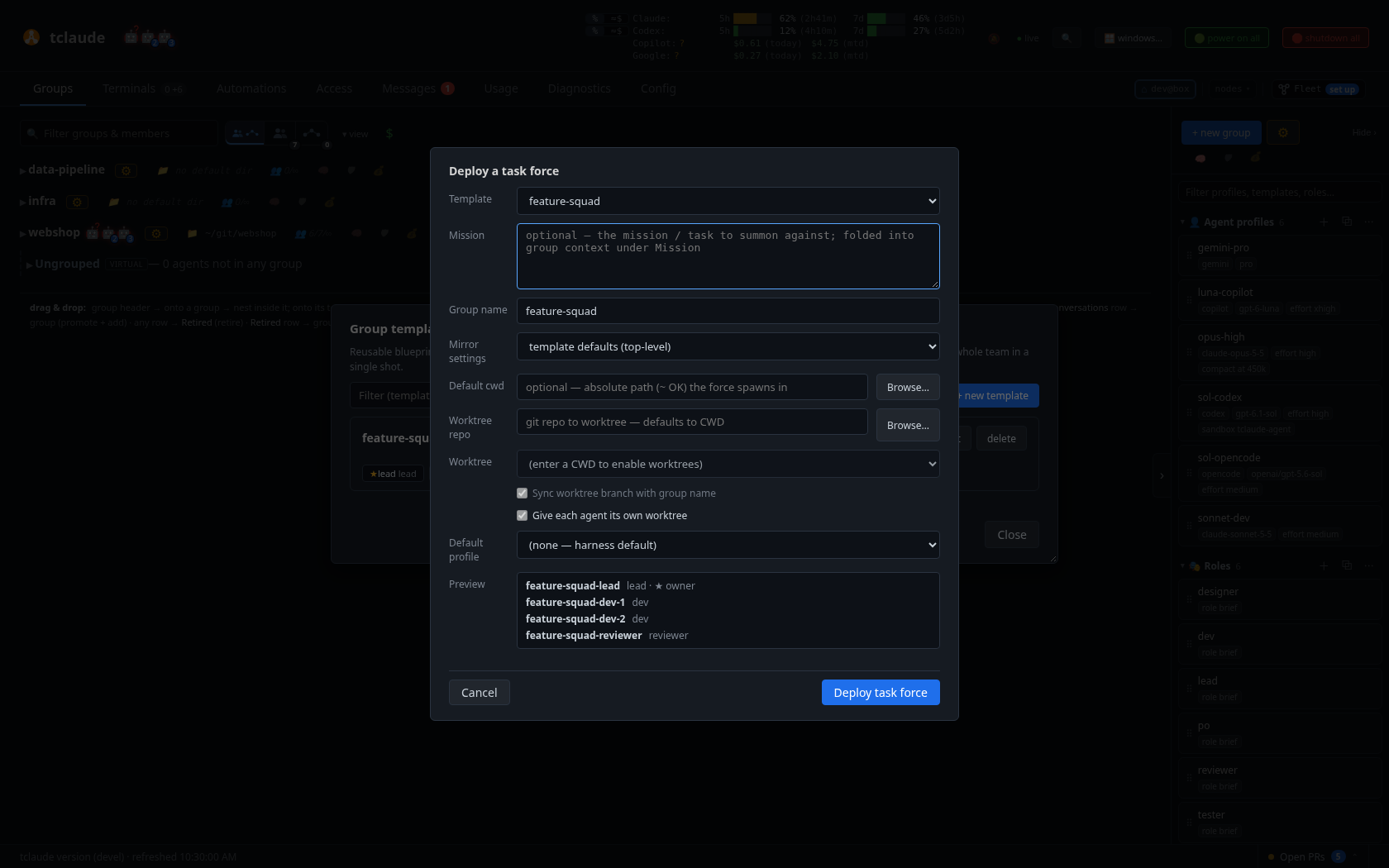
Deploying a task force from a template: mission, group name, worktree options, and a roster preview
tclaude agent task-force deploy review-team \
  --mission "Harden the release pipeline before the 2.0 cut"
tclaude agent task-force status <group>
tclaude agent task-force ls
tclaude agent task-force stand-down <group>
deploy creates a fresh group (named from the mission unless --group is
given), records the mission on the group, briefs every spawned agent with it
under ## Mission after the group's shared context, and
spawns the roster — staged by wave if the template defines waves. Long
missions go in --mission-file (- reads stdin); a Linear epic/issue link
is stored verbatim. The mission is kept apart from the shared context, so it
reaches every member (later direct spawns into the force and re-injection after
compaction included) even when a profile turns the group context off with
include_group_default_context: false; only the shared context follows that
toggle. Forces deployed before this split keep the mission inside their shared
context unless it could be moved out unchanged. The mission is set at deploy; editing the shared
context (groups set-context or the dashboard) no longer changes it. With --worktree <branch> the whole force lands on its
own branch in a git worktree, which becomes the force's
working directory.
Deployment also materializes the template's rhythms (cron jobs, snapshotted at deploy time), seeds its process (advisory phases), and delivers its work pattern — one-shot routed briefings — once the roster is up.
status <group>shows the mission, phase map, per-role liveness rollup, waves, and rhythms.lslists deployed forces (groups with a source template).stand-down <group>winds a force down: retires the roster and sweeps its rhythms and pending waves, keeping the group row dormant.tclaude agent groups rebrief <group>re-delivers the template's current work pattern together with the mission — useful after editing the template mid-flight.tclaude agent process show|advance [--to <phase>]inspects or advances the advisory process. Advancing nudges the roles entering the new phase; it enforces nothing. Needs theprocess.advanceslug or group ownership.
Cron scheduling
The daemon runs a scheduler that ticks every 30 seconds. The stable core is message jobs: a body delivered to a target on a cadence.
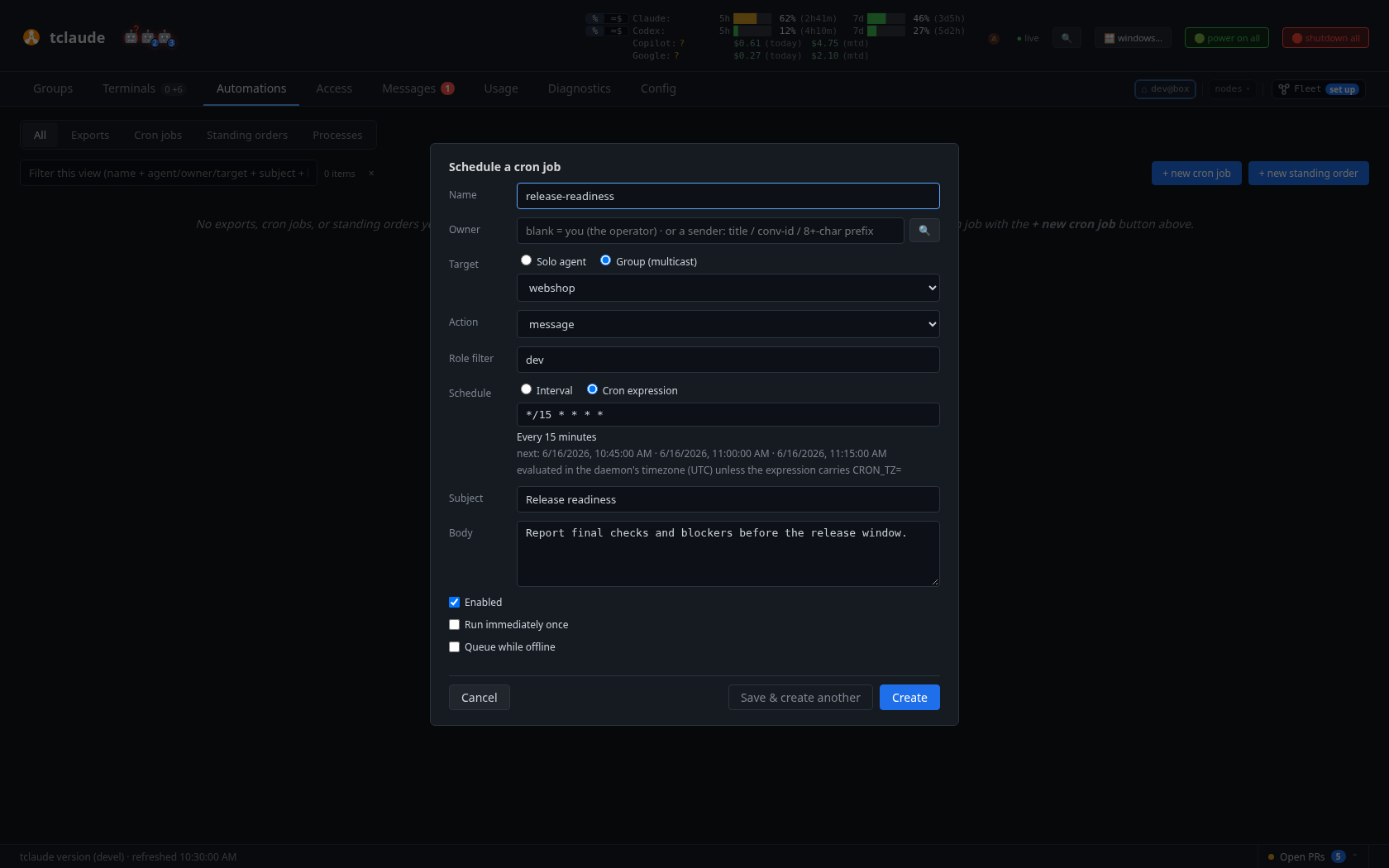
Scheduling a recurring group message from the dashboard’s Automations tab
tclaude agent cron add --name standup --interval 10m \
  --target group:review-team --body "Post a one-line status to the PO."
tclaude agent cron add --cron '@daily' --body "Sweep stale branches."
tclaude agent cron ls
tclaude agent cron logs <job>
tclaude agent cron run-now <job>
tclaude agent cron enable <job>    # and disable
tclaude agent cron rm <job>
The schedule is exactly one of --interval (a Go duration, minimum 30s) or
--cron (a cron expression such as */5 * * * * or @daily, evaluated in
the daemon's local timezone unless prefixed CRON_TZ=<zone>). The target
defaults to self; --target group:NAME multicasts to every current member,
with membership and liveness resolved at fire time, and --role R narrows
delivery to members with that role. --run-immediately fires once right
away, then keeps the normal cadence.
Offline ticks are discarded by default — the logs record
skipped_offline / partial_offline — so a returning agent doesn't face a
burst of stale nudges. Pass --queue-when-offline only when scheduled
messages should accumulate durably in the inbox until the target returns.
Permissions: self.schedule (default-granted) covers self-targeted jobs;
cross-agent jobs need agent.schedule; group-targeted jobs need
groups.messages.schedule, which membership or ownership confers per group.
Spawning on a schedule
cron add --action spawn fires one managed worker per tick instead of a
message. It requires a group target, a --spawn-profile, and an --instruction
template ({{fire_time}} expands to the scheduled firing time). Overlap is
controlled Kubernetes-style with --concurrency Forbid|Replace|Allow plus
--max-live-workers, and --worker-deadline bounds each worker's run. The
job's owner is re-authorized at every firing — a job outliving its creator's
permissions stops spawning.
A disabled spawn profile, or an operator-only one under an agent-owned job,
stops it the same way, whether it is the job's own profile or the group's or
the global default profile: the run is recorded as failed with the profile's
name, and the first such refusal is sent to the owner and to the operator.
Triggers and standing orders
Where cron fires on a wall clock, triggers fire on facts: PR and CI edge
events, plus the dwell-based agent-state facts agent.idle and
agent.awaiting_input (fired once per continuously-true episode). Trigger
rules are created and edited through the dashboard / REST API; the CLI is
read-only:
tclaude agent triggers ls
tclaude agent triggers show <rule>
tclaude agent triggers explain    # dry-run against a hypothetical event
Standing orders are durable guidance delivered when a trigger matches —
"whenever this agent starts a session, remind it of X". They are real and
shipped, authored from the dashboard / REST API, with the same read-only CLI
shape: tclaude agent orders ls|show|explain. Supported trigger points are
session.start, user.prompt, tool.before, tool.after, and
harness-native hook OR-branches, with optional RE2 matching over normalized
event fields. An order declares the delivery timing it requires; a harness
that cannot meet it reports unsupported rather than silently
downgrading — for example, OpenCode has no same-continuation channel, so
only next-turn orders deliver there, via the message queue. Per-agent
cooldowns and trailing-edge debounce (coalescing a burst into one queued
reminder) are supported; orders show includes the per-harness capability
matrix and recent deliveries.
Head aliases
A head alias is a daemon-wide stable handle — po, ceo — that always
resolves to the live head of a conversation chain, surviving any depth of
reincarnation without re-pointing. It is distinct from the agent's name
(its conversation title): the alias is a fixed handle the human curates.
tclaude agent alias set po <selector>
tclaude agent alias ls
tclaude agent alias get po
tclaude agent alias rm po
tclaude agent message po and every other selector-taking command resolve
aliases. Address your coordinator by alias and reincarnation stops being
your problem.
Tags
Tags are short labels rendered as chips in the dashboard's Description
column — deployment stamps its forces with tf:<template> automatically.
tclaude agent tags set frontend urgent
tclaude agent tags add needs-review
tclaude agent tags rm urgent
tclaude agent tags show
Self-tagging needs self.tags; tagging another agent (--target) needs
agent.tags or the groups.members.tags manager path.
Task-reference links
Each agent can carry one http(s) task link — a Linear issue, GitHub
issue or PR, any ticket — rendered as a clickable label in the dashboard's
Task column. The label is auto-derived (a Linear/AWB issue id, GitHub repository
or #456, or the hostname)
or set with --task-label.
tclaude agent task set https://linear.app/acme/issue/JOH-123
tclaude agent task show
tclaude agent task clear
Point workers at their issues at birth with spawn --task <url>. Self needs
self.task; --target needs agent.task or group ownership.
Presenting a PR
present-pr surfaces a pull request in the operator dashboard immediately —
before, or regardless of, branch/statusline detection picking it up:
tclaude agent present-pr https://github.com/acme/repo/pull/42 \
  --summary "route generation fix" --state open
--state open|draft|merged|closed sets the badge; --handled retires a
presented PR from the dashboard. Self needs self.pr; --target needs
agent.pr or the manager path.
A presentation can also raise a notification carrying the PR URL — off by default, see Notifications.
Dashboard exports
When you click an agent's "summary…" action in the dashboard, the daemon nudges the agent's pane with a request id. The agent answers with:
tclaude agent export show <id>       # what the human asked for
tclaude agent export submit <id> report.md metrics.csv
The dashboard shows a spinner until the files arrive, then downloads them;
multiple files are zipped automatically. The flow is always
dashboard-initiated — export is how an agent responds, not a channel it
can open on its own.
The human's clipboard
tclaude agent clipboard copies text to the human's system clipboard via
the daemon, which runs the platform copy tool on the host (wl-copy / xclip /
xsel on Linux, pbcopy on macOS, clip.exe under WSL) — an agent's sandbox
cannot reach the display itself.
tclaude agent clipboard "git rebase --onto main feature~3 feature"
tclaude agent clipboard --file draft.md
Gating is deliberately strict: human.clipboard is not granted by
default and not implied by group ownership. Without the grant, an agent
passes --ask-human <timeout> to raise a one-off approval popup, which
shows the human a preview of the exact text before approving — and offers
"Always allow for this agent" for agents you trust with the channel (see
Permissions and audit). Content is copied
verbatim, whitespace and newlines preserved. This is a human-facing
convenience, not an agent-to-agent data path — peers exchange data through
messages.