Permissions and audit
Running many agents seriously means giving them real autonomy without losing
the ability to answer, later, exactly who did what and under which authority.
tclaude's answer is a single choke point: every mutating tclaude agent
action — from the CLI or the dashboard — goes through the agentd daemon,
which decides the request against a permission model and writes the outcome
to an audit trail. The daemon is fail-closed: the CLI refuses to fall back to
direct database access when agentd is down, so killing the daemon never
bypasses authorization.
The one exception to process identity is an external steward, which proves itself with a credential and is still judged as an ordinary agent.
Identity is resolved from the kernel, not from tokens agents could leak or forge — see Agents and groups. A human caller passes every gate; an agent caller is checked against permission slugs.
Start here
An agent got a 403. The refusal names the permission it needed. You can:
- answer once: the agent reruns with
--ask-human <duration>, and you approve it in the dashboard; - grant it for a while:
+ sudoin the agent's ⚙ menu, or the Access tab; - grant it for good:
tclaude agent permissions grant <agent> <slug>.
To see what an agent can do: tclaude agent permissions ls <agent>.
To see what happened: Diagnostics › Audit.
The slug model
Every gated action maps to a named permission slug. The live registry — 192 slugs — is the source of truth:
Slugs fall into recognizable families: self.* (an agent acting on itself),
agent.* (acting on any other agent), groups.* (roster and settings
administration, including groups.members.*, groups.settings.*,
groups.link.*, and groups.triggers.*), permissions.*, human.*
(channels to the operator), message.direct, templates.*, process.*,
profiles.manage, roles.manage, routes.publish/routes.consume/routes.publish-host,
sandbox-profiles.*, triggers.*, and proxy.*. Don't memorize the list;
query the registry.
An agent may perform an action when the slug appears in its effective set, the union of:
- global defaults (
agent.default_permissionsin~/.tclaude/data/config.json), - live group grants (membership policy — effective immediately, gone the moment the agent leaves the group),
- per-conversation grants,
- active sudo elevations,
- grants contributed by group ownership (see below),
- slugs conferred by membership: a few group-scoped slugs are every active
member's in that group, checked live at each request. They are
groups.messages.schedule, andgroups.resources.read/groups.resources.write(read and change the group's drawing boards; see Drawing boards › Group drawing boards are their members').
An explicit per-agent deny beats everything except sudo. If no source supplies the slug, the request is refused.
Managing grants
tclaude agent permissions ls                  # defaults and overrides
tclaude agent permissions ls <agent>          # effective set for one agent
tclaude agent permissions grant <agent> <slug>
tclaude agent permissions deny <agent> <slug>
tclaude agent permissions revoke <agent> <slug>
tclaude agent permissions grant default <slug>   # edit global defaults
slugs and ls are open reads. grant, deny, and revoke are themselves
gated, on permissions.grant and permissions.revoke — which in practice
keeps them human-only, since those two slugs are also blocklisted from sudo.
The magic target default edits the global defaults list; deny blocks an
otherwise-default slug for one agent; revoke clears either back to the
inherited state.
Defaults installed by setup
tclaude setup --install-default-agent-permissions (idempotent) grants the
self-management baseline: self.rename, self.compact, self.interrupt,
self.clone, self.schedule, self.remote-control, self.task, self.pr,
self.tags, self.dir-repair, self.process, self.page, groups.pages.read,
groups.pages.patch, plus process.templates.read, usage.read, and costs.read.
The two groups.pages.* defaults share a live page within its group
(Live pages); groups.pages.manage
(eval and close) is not a default.
The account read permissions expose quotas/forecasts and cost history through
tclaude usage and tclaude costs.
Self-reincarnation deliberately needs no slug at all. These defaults let an
agent manage its own conversation without letting it touch anyone else's —
every cross-agent verb still needs a separate grant. See
Spawning and lifecycle for the --target
manager pattern and the slugs it checks.
What ownership contributes
Owning an active group structurally contributes grants scoped to that group:
the groups.* roster/settings/link/attachment/nest/archive/schedule slugs
and the groups.members.<verb> manager slugs, process.runs.start (binding
a new process run to the group), plus unscoped human.notify and
process.runs.read. Ownership never confers slugs that mutate shared
configuration (process.templates.manage, agent.sandbox-impl,
sandbox.harness-config, human.clipboard, usage-rules.manage, and similar). groups set-owner-scopes can narrow what
owning a particular group confers — it only takes reach away, never adds.
A group template can carry owner scopes too, and every group deployed from it
starts with them. Creating a template with owner scopes needs only
templates.manage. Changing or removing an existing template's owner scopes
(an edit, an import or bundle that replaces it, a re-snapshot from a group, or
deleting a template that has them) also needs what changing a live group's
does: groups.settings.owner-scopes, permissions.grant and
permissions.revoke. Before this, templates.manage alone could loosen the
narrowing a template's author declared for every later deployment.
Resource umbrellas: resources.read and resources.write
A manager agent that looks after resources across groups gets one grant instead of one per kind:
resources.readreads every drawing board (drawing-boards.read), every process template (process.templates.read) and every process run (process.runs.read).resources.writechanges every drawing board (drawing-boards.write) and process template (process.templates.manage), and impliesresources.read. The per-kind write slugs still do not imply their read slugs.
Both are scoped like any grant. group= reaches the resources linked to
those groups, resource=kind:id (drawing_board:plan, process_template:ship) the
named ones, and no scope reaches every resource. A read passes through any
one of a resource's groups; a write needs every one of them. Operations on
the whole library (listing changes, imports, pinning, creating a new
template) still need the unscoped per-kind slug.
The umbrellas are never default-granted and never conferred by ownership or
membership. A dedicated deny of a per-kind slug (or of resources.read)
still wins over its umbrella. Neither passes an operator lock (see
The operator's lock on a resource), and
run mutations stay on process.runs.manage.
tclaude agent permissions grant ops-manager resources.write --scope group=crew,infra
tclaude agent permissions grant ops-manager resources.read --scope resource=drawing_board:q4-roadmap
Scoped grants
A grant can be narrowed to part of what its slug reaches:
tclaude agent permissions grant builder groups.members.spawn \
  --scope group=dev,staging --scope sandbox_profile=locked-down
tclaude agent permissions grant lead agent.retire \
  --scope target_agent=@self-spawned
--scope takes dim=v1,v2 and repeats for multiple dimensions. The
evaluation rules:
- Within a dimension, matchers OR (
group=dev,stagingmatches either). - Across dimensions, scopes AND (every mentioned dimension must match).
- An unmentioned dimension is unconstrained.
- For local actions, scopes union within a tier, and one unscoped row absorbs the tier — an unscoped grant of the same slug makes the local scoped ones redundant.
- A non-matching scope decides nothing: the check falls through to the other sources, and if none passes, the request gets a 403.
The registry advertises which dimensions each slug supports (group,
spawn_profile, sandbox_profile, process_template, resource, target_agent, and proxy-specific
dimensions). Two relational matchers exist on agent.retire,
groups.members.retire and agent.standdown: target_agent=@self-spawned (agents the grantee spawned)
and @descendants (its spawn lineage, up to 64 generations). Lineage is
recorded only for agent-initiated spawns made after the feature existed;
reincarnation preserves descendants, but a clone is not a child.
Both agent.spawn and groups.members.spawn accept the three spawn dimensions.
A sandbox_profile scope is matched against the profile the spawn will
actually run under: the caller's explicit selection when it makes one, and
otherwise the ambient assignment it inherits — the group's sandbox profile,
else the global one. So a grant naming the profile an operator already set as
the group or global default admits a plain tclaude agent spawn that selects
nothing, and it is what lets a cron or trigger managed spawn — which never
selects a profile — fire under a scoped grant at all. Ambient global and group
layers compose underneath an explicit selection either way.
A group with no sandbox profile assigned and no global default leaves the dimension undescribed, so a scoped grant there still fails closed.
A sandbox_profile scope also has to keep binding the child after the gate, so
a spawn admitted by such a grant is refused when the resolved launch would not
enforce the profile — whether because the mode omits the profile tiers outright
(Codex danger-full-access) or because the implementation stands the OS
boundary down while still composing them (off and resource-only). This
binds only the caller whose authority was conditioned on the profile. An
unscoped grant, an ownership-derived one, or a scope over group alone never
traded on it and is unaffected — the presence of a group or global assignment
somewhere in the deployment is not by itself a restriction. The same rule
applies to a cron/trigger managed spawn, where it is evaluated at fire time
against the launch the spawn profile resolves.
An unscoped spawn grant may select any saved sandbox profile, subject to sandbox lineage. Omitting all inherited profiles remains human-only.
Federation scopes
Remote actions use ordinary slugs with --scope peer=<trusted-peer>[/<group>]:
message.direct, groups.members.spawn, agent.spawn and routes.consume.
agent.spawn accepts only the peer, without a group suffix. Labels resolve
to trusted instance ids at grant time; peer= cannot be combined with any
other scope dimension.
Local and remote grants are disjoint: unscoped grants, local scopes, defaults
and group ownership never authorize remote actions, and peer-scoped grants
never authorize local actions. A deny blocks the slug in both cases. The
receiving operator must also grant the sending instance access to its local
groups. See Federation
for the two grant sets and worked examples. tclaude agent permissions
peer-reach add|remove merges one peer= matcher into an agent's or group's
grant without replacing the others; see
Federation.
Denies are never scoped
permissions deny takes no --scope, by design. A deny is a hole punched in
an agent's authority, and a scoped deny would be a hole with edges you have
to reason about: it would remove one slice while silently leaving every other
slice granted, which reads like a narrowing but isn't one. If you want an
agent to have less, grant less — use a scoped grant. A deny means "not this
agent, not this slug, regardless of what any grant says."
How a request is decided
Putting the pieces together, one request — say agent builder running
tclaude agent spawn dev — is decided like this:
agentdresolves the caller's identity from the kernel. A human passes immediately;builderis an agent, so the gate applies.- The daemon collects every source that could supply
groups.members.spawn: global defaults,builder's group grants, per-conversation grants, active sudo elevations, and ownership-contributed grants. - Scoped rows count only if their scope matches this request (here, the
groupdimension must coverdev). Non-matching rows decide nothing. - An explicit deny on
builderfor the slug refuses the request unless an active sudo elevation supplies it. - If a source passes, the command runs and the audit row records which
scope (if any) authorized it. If none passes, the result is a 403 — also
recorded — unless the call carried
--ask-human, in which case the human gets the last word.
tclaude agent permissions ls <agent> shows the effective set the daemon
would consult, and for messaging specifically,
tclaude agent groups why-can-i-message <target> explains which path
authorizes a send.
The operator's lock on a resource
A process template, a collab drawing board or a live page can be locked against
agent changes. While it is locked, any change an agent makes is refused with
resource_locked (403), and no grant overrides that (not a slug, a sudo
elevation of another slug, group ownership or groups.admin), except
groups.resources.lock itself. Reads stay open: a group's members still read
a locked drawing board. For a process template the lock refuses a save, a delete, a
library-listing change, an unpin and an import over it; pinning it to
another group is still allowed. For a drawing board it refuses the agent's patches,
and for a page it refuses patches, eval, close and a re-show, by the shower
as well as by members.
The operator sets or clears a lock from the dashboard
(POST /api/resource-locks). An agent does it with
tclaude agent resources lock|unlock <kind> <id> (POST /v1/resource-locks)
when it holds groups.resources.lock in every group the resource belongs to
(each group a process template is pinned to); a resource in no group needs an
unscoped grant. The same grant lets the agent change the resource while it
is locked, as the operator can, including a re-show that replaces a locked
page, adopting a locked group page and a config-bundle import over a locked
template. The resource stays locked to everyone else. The slug is never
default-granted, never conferred by ownership or membership and not covered
by groups.admin: the operator grants it, for example scoped to one group:
tclaude agent resources ls <group> lists a group's processes, drawing boards and
pages with their locks, for its members (groups.resources.read). Holding
the lock in the group covers its drawing boards and pages, but not a template that
is also pinned to a group where you don't hold it: the list names those.
An operator of a trusted federation peer can lock from their own dashboard
only as far as this node's grants to that peer reach: the group-scoped peer
grant groups.resources.lock, in every group the resource belongs to.
Unrestricted trust holds it; it is never granted by default. A federated
agent never toggles a lock on another node. Listing a group's resources
there, with their locks, takes the separate peer grant
groups.resources.read (also held by unrestricted trust, never by default). A process or drawing board
lock is stored and is removed when its drawing board or template is deleted, so a new
resource with the same id starts unlocked. A page lock lasts until the page
is closed. A resource is unlocked by default.
What a lock does not cover: - It locks a page's tclaude-side state, not its content: an agent still serves the page from its own dev server or files, and a page still closes when its agent retires. - A linked peer's operator reaching this node's process editor through peer view acts as an operator, not as an agent, so the lock does not refuse that. A peer never toggles a lock.
Sudo: time-bounded elevation
For work that needs a slug an agent doesn't hold — and shouldn't hold permanently — the agent requests a bounded elevation:
tclaude agent sudo request agent.stop groups.members.spawn \
  --duration 30m --reason "winding down the review team"
tclaude agent sudo ls          # my active elevations
tclaude agent sudo ls --all    # everyone's (human view)
tclaude agent sudo revoke <id> # end one early (or --conv <agent>, or --all)
Every agent-originated request raises a human-approval popup — there is no
silent path. On approval, the slugs join the agent's effective set until the
window expires or a human revokes early. Duration is capped at 1 hour
(default 5 minutes). The permanent-escalation slugs permissions.grant and
permissions.revoke are blocklisted from sudo: the audit trail of a
time-bounded grant is the whole point of the model, and a sudo that could
mint durable grants would defeat it.
The human form sudo request --target <agent> <slugs…> grants proactively
with no popup — the operator's own shell is the consent. Agents cannot use
--target.
The dashboard grants through the sudo variant of the permission editor (see
Access). It can also narrow a grant with a scope and extend
one that is running. An extension keeps to the same maximum, measured from now,
and is recorded as sudo.extend.
Use limits
A dashboard grant of a countable permission can also carry a use limit, for example any group for 10 minutes, at most 5 agents. It ends at whichever runs out first, the time or the count, and the daemon enforces both.
One permitted action is one use. The daemon takes the use atomically before the
action, so parallel requests cannot exceed the limit, and gives it back when the
request is refused or fails. Reading (GET), dry runs, import previews and a remote
control status check are free, and uses are only spent where sudo is what allowed the
action: standing access leaves the grant untouched.
These count:
- spawns:
agent.spawn,groups.members.spawn. One use per launch, given back if the launch fails. A spawn that started and later died has used its count, and so has one whose pane was not seen to come up in time. - an agent's own actions, such as
self.rename,self.compact,self.clone,self.taskandself.tags. - actions on other agents, as
agent.*andgroups.members.*: stop, resume, retire, delete, rename, compact, interrupt, clone, morph, promote, reincarnate, remote control, task, tags, PR and process. - group changes:
groups.create,groups.delete,groups.rename,groups.clone,groups.archive,groups.nest,groups.attachment,groups.import,groups.owners.manage,groups.link.add,groups.link.remove,groups.members.add,groups.members.remove,groups.members.update. - group settings: every
groups.settings.*slug, fromgroups.settings.descriptiontogroups.settings.owner-scopes. One save spends one use of each setting it changes, so a save of the description and the default directory spends one of each grant. A rejected save changes nothing and gives both back, but a save that fails after writing some fields keeps its uses. Reads spend nothing, and neither does an agent also covered bygroups.adminor, for most of these slugs, by owning the group. message.direct,human.notify,human.clipboard.templates.manage,templates.instantiate,profiles.manage,roles.manage,prompts.manage,process.templates.manage,process.runs.start,process.runs.manage,process.advance,usage-rules.manageandsettings.default-model.
Everything else takes no limit, and the editor says why on the row:
- slugs that only read, or are part of a spawn such as
groups.members.spawn.model. groups.admin, which covers many actions: limit the specific permission.- schedules and triggers, which act later with no request to count.
- slugs one task checks many times: drawing boards, dashboard marks, the proxies, sessions and routes.
- slugs that act across a peer link, such as moves, teleports and remote jobs.
A limited grant only works where a use can be counted. Triggers, schedules, moves and other checks made outside a request refuse it, and a grant scoped to a peer takes no limit.
Asking the human at the moment of denial
Most mutating commands accept --ask-human <timeout> (capped at 300s;
timeout means deny). When the permission check fails, instead of a flat 403
the daemon creates an access request the operator sees in the
dashboard Messages tab, with Approve, Decline, and
+5m actions (Approve, Deny and +5 min in the companion). The agent's command blocks until the human answers or the
timeout expires.
At most 8 requests from one agent, and 64 in all, wait for you at a time. Past that a new request is refused at once with a message to ask again later, and the requests already waiting are not affected.
An archive has nothing you could read in its bytes, so a workflow, agent or group import asking this way shows you a review instead: what the file holds, who signed it, what importing changes here and any elevated items, in the words the CLI uses for its own preview. The file is held in memory while you decide, so one agent may hold 128 MiB and all of them 256 MiB. A larger file is refused, and needs the permission granted first or the operator to import it. A file the node cannot read says so, and you should decline it. Any other request body that is not text is left out of the card rather than shown as raw bytes.
For exactly two slugs — human.clipboard and human.notify — the card also
offers "Always allow for this agent", which persists an allow keyed to
the stable agent id (recorded as granted by human:popup-always). These are
the two agent-to-human channels, where "this agent may always reach me" is a
sensible durable decision; no other slug gets an always-allow shortcut. Gates
that describe a scope dimension offer a scoped variant of the same card.
The audit trail
The daemon records a symbolic audit_log row for every daemon-proxied
command, from both the CLI and the dashboard: who ran what against
which target, when, and with what outcome. Rows are symbolic — actor,
verb, target, group, a short bounded detail — never pane content, prompts,
or subprocess output.
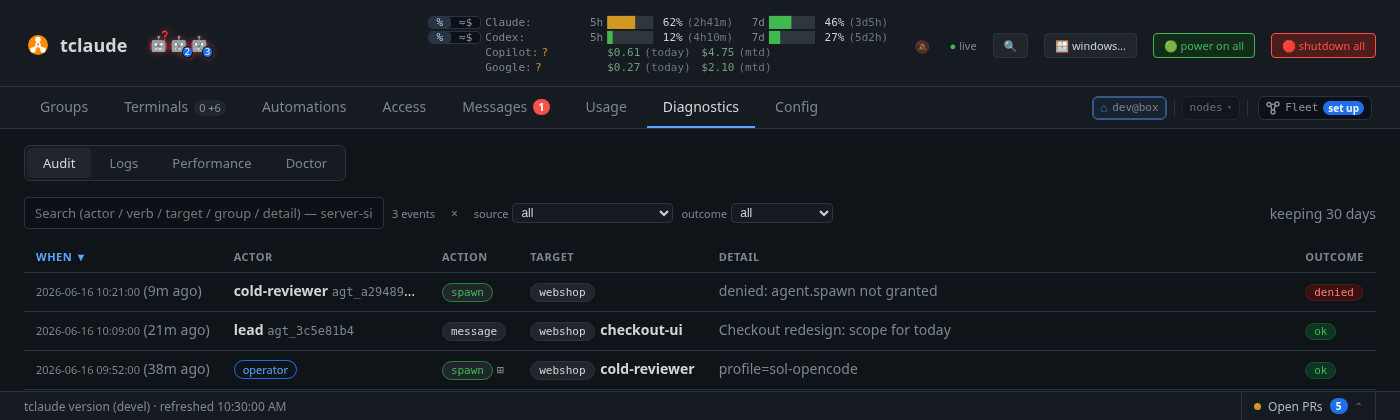
An audit row recording a rejected spawn: actor, verb, target, detail, and outcome
Three properties make the trail defensible rather than decorative:
- Denials are recorded too. A 403 or any other failure writes a row, so the trail answers "who tried to do what", not only "what landed". An agent probing for authority it doesn't have is visible.
- Scoped authorization is attributed. When a command passed its gate on a scoped grant, the row records which scope matched. "Spawned into dev" reads very differently once you know the same agent is barred from prod.
- Sudo is visible. Requests, the operator's decision, the stated reason, and every command executed under the elevation all land in the trail.
- Environment values are not kept. A spawn row lists the names of the
environment variables it set, with each value as
[redacted]. Upgrading redacts the spawn rows already stored the same way, though scraps of the old rows can stay in the database file's free pages. Rotate a token you believe was exposed.
Browse and filter the trail in the dashboard's Diagnostics › Audit view. Retention
defaults to 30 days; set audit.retention_days in
~/.tclaude/data/config.json to keep more, or a negative value to keep
forever. The hourly sweep re-reads the config, so changes apply without a
restart — and a corrupt config skips the sweep rather than pruning against a
guessed policy.
The exit audit
Separately from command rows, the daemon keeps an exit ledger for managed
sessions: when a pane ends, a managed_pane.exit row records the bounded
evidence — cause (normal exit, signal, launch failure, or disappeared), exit
code or signal, which observer saw it, and the launch phase it died in. When
the exit was requested (stop, force-stop, retire, reincarnate), the row links
back to the lifecycle command that asked for it, so a dead agent is never
just "gone": the trail distinguishes an ordered shutdown from a crash, and a
crash from a launch that never came up. Spawn failures surface this evidence
directly ("managed pane exited during startup (signal …)"), with the pane's
output tail in the dashboard's Diagnostics › Logs view.
Empty cause fields mean the evidence was unavailable — the ledger never infers a cause it didn't observe.