Ask
New to tclaude?
Start with the Learn path.
tclaude ask puts a one-shot question to a coding harness without creating
a tmux session or taking over your terminal. It prints the answer, exits
with the harness's status, and keeps a resumable thread for the next
question from the same terminal and directory. All six agent harnesses —
Claude Code, Codex CLI, OpenCode, Copilot CLI, Gemini CLI, and pi — have an
ask surface.
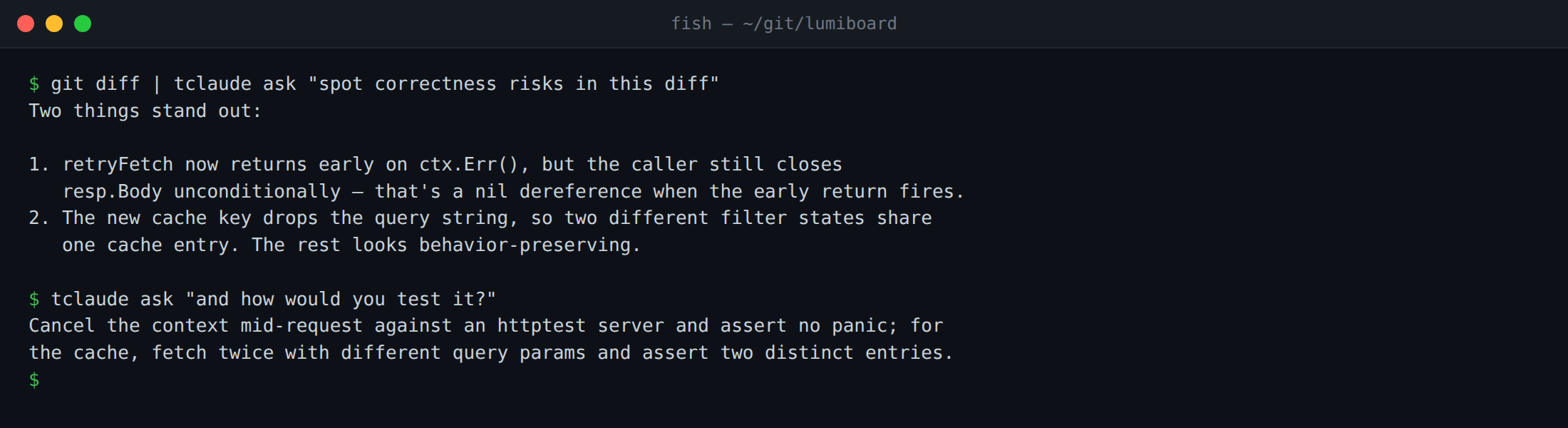
Piped input and a follow-up on the same per-terminal thread
# Ask about the current project
tclaude ask "where is authentication enforced?"

# Fold piped input into the question
git diff | tclaude ask "is this safe to merge?"

# Capture a clean answer in a script
summary=$(tclaude ask "summarize this package in one sentence")

# Open the full harness TUI for a back-and-forth
tclaude ask -i "help me refactor this package"
Print mode (-p, the default) streams or prints the answer and returns to
the shell; it is safe for pipes and command substitution. Interactive mode
(-i) attaches the harness's normal TUI to the current terminal — it needs
a real tty. Neither creates a tclaude session; use
Sessions when you want detach/reattach.
Thread continuity
The thread key is the current terminal plus working directory, stored in tclaude's SQLite database. Repeated questions from the same terminal in the same directory resume one conversation; changing either starts or resumes a different bucket.
tclaude ask -w                     # show this bucket: terminal key, cwd,
                                   # current conversation id
tclaude ask -n "new topic: review the db package"  # fresh thread
tclaude ask -n                     # reset the bucket without asking
A fresh thread records which harness answered it, and an existing thread
always keeps its recorded harness, even if you change the default later
— use -n to pick up a new default. If the thread's conversation was
deleted in the harness, the next ask detects the stale mapping and starts
fresh. -w/--where on a fresh bucket reports the key without resolving a
harness.
Harness, model, and effort
A fresh ask uses the configured ask profile, then ask-specific settings, then
the global default spawn profile. With none set, it defaults to Claude Code
with sonnet / medium. Per-call flags override model and effort:
To change the default harness for fresh asks, select a saved spawn profile
in the dashboard (Config › Ask & scribe) or set ask.profile
in ~/.tclaude/data/config.json. The profile supplies harness, model, and effort defaults. When an ask sandbox
policy is active, compatible ask/global spawn profiles also supply its sandbox
implementation, native mode, and approval policy. Identity fields require a
tracked worker. A deleted profile falls through to ask-specific settings and the
global default instead of failing. ask.model and ask.effort override the
corresponding global values. The global profile can select any supported
harness; unset non-Claude model/effort fields use that harness's defaults.
Resolution order per field: per-call flags → selected ask profile →
ask.model / ask.effort → global default spawn profile → harness built-ins.
The harness comes from the ask profile, then the global profile, then Claude
Code. Group defaults never participate. Incompatible ambient global
model/effort values are skipped, including when resuming a thread recorded
under another harness; explicit ask values are still validated.
Sandbox policy
ask.sandbox controls sandbox-profile resolution for both captured asks and
-i foreground TUIs. Configure it beside Ask — profile in the
dashboard's Config › Ask & scribe, or in the config file:
global(the default): use the dashboard global sandbox profile. With no global profile configured, ask retains its ordinary harness behavior.auto: combine global and group sandbox profiles. Match the ask's canonical working directory exactly against active groups' default directories, as session auto-join does. Zero matches uses global only. Among multiple matches, one group marked as the default spawn group wins; otherwise ask refuses and suggestsglobalor a named policy. Matching never creates or joins a group.- A profile name: use exactly that library profile and its includes, without
global or group policy.
profile:<name>also works, including for a library profile namedauto,global, oroff. off: skip sandbox profiles and preserve ordinary ask behavior.
Existing threads resolve the current configured policy each turn. Their conversation IDs and harnesses remain intact; changing policy does not create or migrate a thread. Successful confined launches disclose the resolved policy on stderr. Missing policies, unavailable host tooling, and unsupported policy shapes fail before the harness starts.
An active policy uses the compatible ask/global spawn profile's implementation,
otherwise tclaude-layer. off and resource-only implementations cannot
satisfy a requested ask policy. Native implementations must establish actual
confinement and represent the authored rules. Claude, Codex, and Gemini support
foreground policy replay; Copilot and OpenCode lack that replay contract, and
Pi's isolated state currently requires tracked-session lifetime. These asks
refuse an active policy with guidance to use a supported harness or tracked
worker.
| Harness | Ask sandbox support |
|---|---|
| Claude Code | Outer wall or a verified confined native sandbox capable of the authored rules |
| Codex | Outer wall or a confined native sandbox capable of the authored rules |
| Gemini CLI | Outer wall; its native sandbox cannot represent the requested profile |
| Copilot CLI | Refused: foreground policy replay is not supported |
| OpenCode | Refused: foreground policy replay is not supported |
| pi | Refused: isolated state needs tracked-session lifetime |
With a global policy configured, the default global setting therefore changes
Copilot, OpenCode, and pi asks from direct execution to an actionable refusal.
Set Ask — sandbox → Off (ask.sandbox=off) to retain direct asks, select an
ask profile for Claude, Codex, or Gemini, or use a tracked worker. Foreground
replay for Copilot/OpenCode and pi isolated-state lifetime are known follow-ups.
Directory provisioning, pre-launch scripts, native profiles, the outer wall, and resource limits share the one-shot worker launch preparation. Foreground stdio and terminal process-group behavior are preserved. Cleanup reaps a delegated cgroup when available. Without proof that all descendants have stopped, per-run directories are retained until a boot change; the stderr notice gives the path for manual removal after descendants stop. A live foreground owner is protected from background sweeps.
Model-gateway caller identity is not available to untracked asks: a configured gateway with an active policy is refused. Named-proxy access is disclosed as unavailable when a confined ask would otherwise inherit it. Use a tracked interactive worker when either is needed.
Piped input
Piped stdin is appended to the typed question as context. Question and
payload travel as a single process argument behind the harness's
end-of-options guard (or as the prompt-flag value for Copilot), so diff
lines starting with - cannot be parsed as CLI flags.
rg -n "TODO|FIXME" . | tclaude ask "which of these should be fixed first?"
git show HEAD | tclaude ask "write a concise review"
Capture safety
Print mode is designed so a captured answer cannot quietly modify your workspace:
- Codex print runs
codex execin a read-only sandbox, with no git-repo requirement. It can inspect the directory but not change it. - Claude Code print uses the non-interactive
claude -ppath. - Copilot print runs headless
copilot -p, buffered — the answer arrives whole rather than streaming. tclaude passes no permission flags: headless, a tool call that would need approval is simply denied and the turn finishes without it. tclaude also unsetsCOPILOT_ALLOW_ALLfor every ask so that variable cannot promote the turn from your environment. This is Copilot's own headless fallback, not an OS sandbox. - Gemini print runs headless
gemini --prompt, buffered. Like Copilot, headless Gemini denies any tool call that would need approval. Gemini refuses to run headless in a directory it does not trust. - pi print runs
pi --print, or streams throughpi --mode jsonon a terminal. pi itself never asks before a tool call, so tclaude limits a capture to pi's read-only tools (read,grep,find,ls): no shell and no file writes. An interactive pi ask instead loads tclaude's permission extension, so you approve each tool call that is not read-only in the pane.
Codex, Copilot, Gemini, and pi write verbose output to stderr; tclaude hides them by
default and keeps only the answer on stdout. -v/--verbose shows the
transcript, and a failure always reveals it so auth or model errors are not
swallowed.
Codex mints its conversation id on the first turn, so tclaude discovers a fresh Codex thread's id after the run completes.
Claude's terminal stream uses a paced typewriter renderer; disable that
presentation layer with --no-smoothing or TCLAUDE_ASK_SMOOTH=0 (piped
output is never smoothed).
Flags
| Flag | Purpose |
|---|---|
-p, --print |
Print the answer and exit (default) |
-i, --interactive |
Open the full harness TUI; needs a real terminal |
-n, --new |
Forget the current terminal/directory thread first |
-m, --model |
Override the model for this turn |
-e, --effort |
Override reasoning effort for this turn |
-w, --where |
Print the current ask bucket and exit |
-v, --verbose |
Keep the harness's capture transcript on stderr |
--no-smoothing |
Disable the paced Claude terminal render |