Keep agents going
A lead like alice runs for hours or days. Her context window fills up,
she gets stopped and woken again, and her team needs a nudge now and then.
In this tutorial you keep a long-running agent on track. You watch its
context, schedule check-ins, stop and wake it, give it a fresh session or a
different model, and bring back agents and conversations from earlier.
You need: Run a team through a lead completed: alice
leading hello, and bob retired.
1. Watch the context
Each row's State column has a small meter beside the pill: how full the agent's context window is. Hover it for the numbers. When it gets high, the harness compacts the conversation on its own, summarizing it and carrying on, or you can step in with the actions below.
A compaction can drop the agent's first message, where its identity and brief live. tclaude sends them again after every compaction: the agent's name and groups, and the group's startup context from Set up your team. Keep that context up to date, and even a long-lived lead keeps working the way you want.
2. Schedule check-ins
A lead waits for mail. If a worker goes quiet, nothing wakes the lead to
notice. A scheduled message does. Open alice's ⚙ menu and choose
⏰ schedule…. The dialog targets alice. Set:
- Schedule: Interval,
1h; - Body:
Check on your workers. Nudge any that have gone quiet, and send the human a notification if one is stuck.
Click Create. Every hour the message lands in alice's inbox. While
she is stopped, the ticks are skipped, so she does not wake up to a pile of
stale reminders.
Agents schedule their own check-ins too: ask alice to "check on your
workers every hour" and she sets it up herself. The Automations tab →
Cron jobs lists every scheduled job, yours and the agents', with edit,
run-now and delete.
3. Stop and wake
A stopped agent stays in its group with an empty status dot, ○. Stop
alice from her status dot (Soft exit), then click the dot again to
wake her. She resumes the same conversation, through the harness she ran
on, with her groups, permissions and scheduled check-ins.
The 🟢 and 🛑 buttons beside the spawn button act on the whole team: the green one wakes every stopped member, the red one stops every running one. Stopped agents are shown by default. If you have hidden them, ▾ view at the top of Groups has show offline.
4. Clone or reincarnate
Two actions in an agent's ⚙ menu make a new session from an old one:
- Clone forks the agent. The original keeps running, and a sibling,
alice-c-1, starts with a copy of its conversation, groups and permissions. Use it to try a second approach in parallel. - Reincarnate replaces the agent. A fresh session with an empty context window takes over its identity: agent id, groups, permissions and inbox. Use it when the context is full of things the agent no longer needs.
Open alice's ⚙ menu and choose clone… under send elsewhere.
Pick your own node, marked (this node), and click Clone here…. The
clone dialog opens.
Leave Copy conversation history ticked, give it a Follow-up such as
List the project's dependencies., and click Clone. alice-c-1 appears
next to alice. Retire it with its bin button
when you are done.
Now choose reincarnate in alice's ⚙ menu. Keep the recommended
Ask the agent to reincarnate itself: alice writes a handoff for her
successor at her next clean point, then reincarnates. An optional Focus hint
tells her what the handoff should cover. Click Ask agent. (Force
reincarnate now is for an agent that is stuck: it skips the handoff.)
The successor keeps the name alice. The replaced session is kept as
alice-x: ▾ view → show replaced generations
lists it.
5. Change model in place
Morph relaunches an agent with a different model, effort or harness. It keeps the agent's conversation, id, inbox, groups and permissions. The dashboard morphs into a spawn profile:
- Save a profile with another Model (for example Sonnet), as in
Set up your team. Name it
sonnet. - Open
alice's ⚙ menu → morph…, and picksonnetunder Profile.
The dialog previews the change, was and now, before anything
happens. A profile for another harness moves alice there: tclaude
translates her conversation, and the preview says what the history keeps
and loses.
Click Morph at next idle turn. If alice is busy, the morph waits until
she is idle (within 30 minutes, or the request lapses), and her row shows a
⇢ morph badge beside the state pill. Tick now to stop her at once
instead.
Go deeper
Spawning and lifecycle → morph covers everything a morph changes and keeps, and Harnesses → Cross-harness history translation what a harness move carries.
6. Bring back earlier work
Retired agents and past conversations are kept. Open ▾ view and tick show retired and show conversations. Two blocks appear at the bottom of Groups:
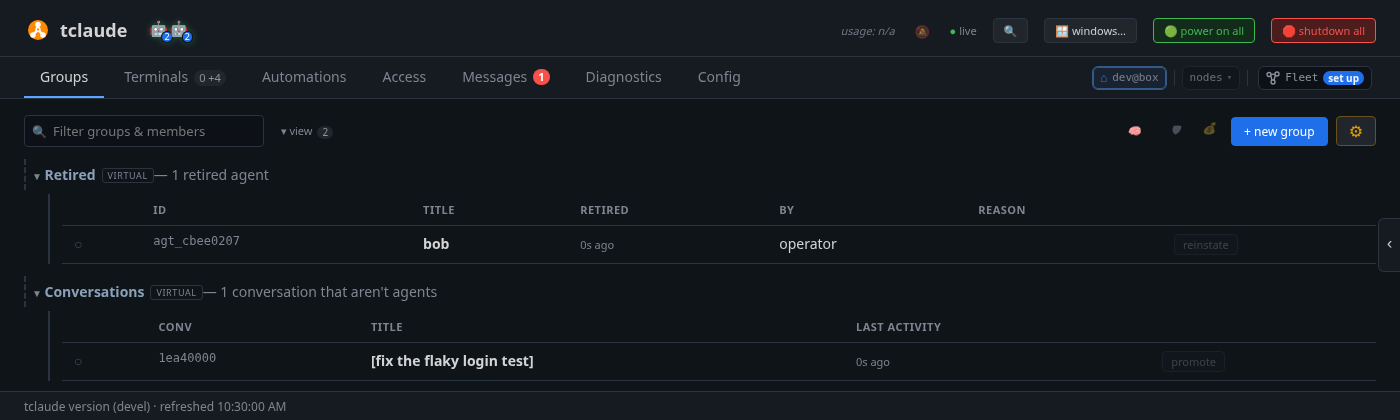
- Retired lists retired agents. reinstate makes
boban agent again, in Ungrouped. Drag his row ontohelloand click his status dot to wake him. His old permissions do not come back. - Conversations lists recent sessions that never became agents, for
example a
tclaudesession in a directory no group uses. (A session started in a group's directory joins that group automatically.) promote turns one into an agent, which you then drag onto a group and wake.
With many agents, type in the filter box at the top of Groups. It matches group names and each agent's name, role, description, directory and branch.
Go deeper
Spawning and lifecycle → retire, reinstate, delete and Promote.
From the terminal
The CLI has a few things the dashboard does not: compacting on demand, morphing without a profile, undoing a morph, and searching inside past conversations.
tclaude agent context-info -g hello           # context of every member
tclaude agent compact -t alice "Continue where you left off."
tclaude agent clone -t alice "List the project's dependencies."
tclaude agent reincarnate -t alice "Summarize how this project is structured."
tclaude agent morph alice --model sonnet --dry-run
tclaude agent morph alice --back              # undo the last morph
tclaude agent cron ls                         # scheduled jobs
tclaude conv search -g "flaky login"          # search inside every conversation
tclaude conv resume -g <conv-id>              # continue one in a new session
conv resume relaunches through the harness that recorded the
conversation, in its own project directory.
Lifecycle verbs and
Conversations cover these commands.
What you learned
- The context meter shows how full an agent's window is. After a compaction, tclaude re-sends the agent's identity and the group's startup context.
- ⏰ schedule… sends an agent a message on a schedule. Automations → Cron jobs lists every job.
- The status dot stops and wakes an agent; the group's buttons do it for the whole team.
- Clone forks a sibling, reincarnate replaces the agent with a fresh session that keeps its identity, and morph changes model, effort or harness in place.
- ▾ view shows retired agents (reinstate) and past conversations (promote).