Agents and groups
New to tclaude?
The tutorial Run a team through a lead walks through a first team step by step.
An agent is a conversation registered with the agentd daemon: it has a
stable identity, belongs to groups, and can exchange mail with its peers and
the operator. This page covers the daemon in brief, how identity works, what
groups are, and how messaging behaves. Spawning new agents and managing their
lifecycle is on Spawning and lifecycle; the
permission model those features gate on is on
Permissions and audit.
The agentd daemon
tclaude agent is a thin client. Everything it does — identity resolution,
permission gating, message delivery, spawning — routes through tclaude
agentd, a long-running daemon that owns the SQLite database at
~/.tclaude/data/db.sqlite and the tmux nudges into agent panes. Nothing
under tclaude agent works without it: the CLI deliberately refuses to fall
back to direct database access when the daemon is down, so killing the daemon
never bypasses authorization. Fail-closed is the design, not an accident.
Start it in a non-sandboxed shell (it needs the tmux socket and the database):
It also ships as a standalone binary, tclaude-agentd, with the same code
and flags (go install . ./cmd/... builds both). Keep tclaude on PATH
next to it — the daemon forks tclaude session new to spawn agents. The
daemon runs in the foreground; restart it after upgrading tclaude, because
the CLI and daemon share an evolving request schema and an old daemon
silently drops request fields it does not know.
Agents reach the daemon over a Unix socket, canonically
~/.tclaude/api/agentd-socket/agentd.sock — kept outside ~/.tclaude/data/ so sandbox
profiles can deny the private data tree while leaving the socket reachable.
The human additionally gets a loopback HTTP listener on a random port for
the dashboard and human-approval popups (--dashboard-port
pins it; a taken configured port fails startup rather than falling back).
The CLI is resilient to daemon restarts: connections retry with backoff, and mutating requests carry a stable request ID that the daemon records in a request-outcome ledger, so a retried request replays the completed response instead of mutating twice.
Daemon-side configuration lives under agent.* keys in
~/.tclaude/data/config.json.
For the full architectural model — what state lives where and how the pieces relate — see Architecture.
Identity: who is calling
The daemon authenticates every request without tokens for agents. It reads
the connecting process's PID from the kernel (Unix socket peer
credentials), then walks the host process tree looking for a recognized
harness runtime — any registered harness binary (claude, codex, opencode,
copilot, gemini, pi) or Claude Code's node.
Recognition uses the process name or the kernel-reported executable path
(/proc/<pid>/exe), because argv[0] and the comm name are spoofable.
Every request lands on one of three verdicts:
- Agent — a harness ancestor was found. The daemon resolves which
conversation the process belongs to and maps it to a stable agent id
(
agt_…) that survives/clearconversation rotation and reincarnation. Agent requests pass through the permission model. - Human — no harness ancestor, plus a valid operator token (or the cookie-authenticated dashboard). The human bypasses every permission gate.
- Refused — anything else. There is no "assume human" path.
The operator token (tclo_ prefix) is minted fresh at each daemon start,
held in memory only, and by default printed only when both stdout and stderr
are real terminals;
you export it as TCLAUDE_HUMAN_TOKEN. There is nothing durable for an
agent to steal, and a harness ancestor always beats a token: an agent that
somehow obtains the operator token still authenticates as an agent (the
daemon also strips the variable from sessions it spawns). Opt-in
persistence exists (a 0600 ~/.tclaude/data/operator_token file the CLI
auto-reads, or the OS keychain), but the default is ephemeral.
agentd serve --print-human-token=auto|always|never controls the startup
banner and the --tui dashboard sign-in link. The default auto hides secrets
when either output stream is redirected. never suppresses them even in a
terminal; the legacy --no-print-human-token is an alias for never and
conflicts with always. always explicitly prints even to redirected output:
under systemd this puts the bearer token in the journal, where local users may
read it. Token generation and authentication are unaffected.
TCLAUDE_SESSION_ID is a routing key, never authentication.
tclaude agent whoami          # print your resolved identity
tclaude agent lookup <name>   # resolve a name or ID prefix to its agt_ id
tclaude agent ls              # list agents reachable to you (your groups)
Wherever a command takes an agent selector, you can pass the agt_ id
(preferred — immune to conversation rotation), a full conversation id, an
8+-character conversation-id prefix, a global head alias, or the display
title.
Exit codes
tclaude agent commands that talk to the daemon exit with a code a script
can branch on:
| Code | Meaning |
|---|---|
| 0 | Success. |
| 1 | Not found: no agent, group, message or other target matched. |
| 2 | Ambiguous: a selector matched more than one target. |
| 3 | Invalid argument. |
| 4 | I/O failure: the daemon is unreachable, or it failed for another reason. |
| 5 | Refused: an identity failure, a permission denial, or any other HTTP 403 from the daemon whose code does not map to 1–3 above. |
A permission denial exits 5. Earlier versions exited 4, the same as an I/O failure, so a script could not tell "you may not do this" from "the daemon is down". A script that retried on 4 should not retry on 5: a retry will not grant a permission.
Becoming an agent
There are two paths into agenthood:
- Spawn — the daemon launches a fresh session directly into a group, with a briefing. See Spawning and lifecycle.
- Promote — enroll an existing plain conversation as an agent:
Promote also reinstates a retired agent. Cross-agent promotion is gated
(agent.promote, or the group-scoped manager equivalent — see the
manager pattern).
Groups
A group is the allow-list of who can talk to whom, plus shared
settings: startup context, a default directory, a default spawn profile, a
common spawn environment, and a member cap. Reads (ls, members, owners) are open to any agent;
mutations gate on groups.* permission slugs.
tclaude agent groups create myteam --context-file brief.md
tclaude agent groups add myteam <selector> --role reviewer
tclaude agent groups members myteam
create can bootstrap members inline
(--member name=..,role=..,descr=..,cwd=..). Beyond the roster verbs
(add, remove, move, update-member, rename, rm), groups carry a family
of settings verbs — set-context, set-default-dir,
set-default-profile, set-environment, set-descr, set-max-members,
set-notifications, set-owner-scopes, set-remote-control — plus
archive/unarchive, clone, bulk stop/resume/retire, rebrief,
export/import (human-only by default; groups.export and groups.import), persistent attachment reference links,
and nest (dashboard tree cosmetics only — nesting inherits nothing).
A group's default spawn profile applies to every spawn into the group,
including the workers of its triggers, schedules and processes. An agent may
only set a default profile whose grants it could confer itself: one that sets
permission overrides, or names roles with grants, takes permissions.grant
and grants no wider than the agent's own. A profile that makes its spawns
owners takes groups.owners.manage for the group. Owning the group is not
enough for either. Editing what a profile or role confers takes the same
authority; see spawn profiles and roles.
Membership transfers are recorded in the audit
trail.
For reusable team blueprints, scheduled check-ins, and mission-framed deployments built on top of groups, see Teams at scale.
Ownership
Owners (grant-owner / revoke-owner) can message members without being
members themselves, and ownership structurally contributes permissions: the
group-scoped groups.* roster and settings slugs plus the
groups.members.<verb> manager slugs for the owned group, and unscoped
human.notify and process.runs.read. It never confers slugs that mutate
shared configuration. groups set-owner-scopes lets you narrow what owning
a particular group confers (it only takes reach away). Details on
Permissions and audit.
Group startup context
groups set-context (or --context/--context-file at create) stores
shared context that is delivered as part of every spawned member's startup
briefing — the standing brief every member of the team should start with.
A single spawn can opt out with --no-group-context, and spawn profiles
carry an include_group_default_context field.
Re-injection after compaction and /clear
A harness compaction summarizes the first turn, where the startup briefing
lives, and /clear drops it. On either boundary tclaude queues an ordinary
inbox message (on every harness that reports the boundary) re-injecting what
the summary may have lost:
- after a compaction: the agent's identity (name, role, groups, spawner, worktree), the group startup context as it reads now, the profile/role startup context it was spawned with, and a pointer to the original briefing message and task link — never the full brief;
- after
/clear: the identity only.
The group used is the spawn group while the agent is still in it, otherwise
its oldest-joined group. That group's Re-inject after compact setting
(Group settings dialog, or groups set-reinject) chooses contexts (the
default, as above), identity (identity only after a compaction too), or
off:
Only the agent's own compaction counts, not one by an in-harness subagent. Claude Code's compaction hooks look the same for both, so while a subagent is running tclaude holds the message until the agent's next turn event and sends it only if the main transcript recorded a compaction. If the transcript can't be read it sends the message anyway.
Claude Code, Codex, OpenCode, pi and Copilot all report compactions. Gemini CLI does not, so a Gemini agent gets nothing after one; see Startup-context re-injection.
The rest of tclaude waits for the same answer. A compaction that might be a subagent's skips the pre-compact guard and the "compacting" status. The agent's context figures and nudge state are reset only once the compaction is proven to be the agent's own, and at that point any standing orders triggered by the compaction are delivered as messages rather than hook context.
Group spawn environment
The dashboard's consolidated Group settings dialog edits the default directory, startup context, default spawn and sandbox profiles, environment, policies, and persistent link together. The CLI equivalent for environment is:
Omit every --env to clear the group environment. Resolution lives in the
daemon, so the same settings reach dashboard, CLI, and agent-to-agent spawns.
Existing agents pick up the current group environment after restart,
stop/resume, clone, or reincarnation; their already-running process is not
modified in place. The group's web terminal also inherits these values when its
persistent tmux session is first created; an existing terminal keeps its
original environment.
Moving an agent between groups
tclaude agent groups move old-team <selector> new-team \
  [--keep-permissions] [--keep-sandbox] [--keep-environment]
Dragging a member onto another group's box in the dashboard does the same. The confirm dialog has one checkbox per group-sourced setting, all ticked by default, each reading "Switch to new-team's …"; unticking one keeps that setting on the group the agent leaves. The agent keeps its role and description, and its per-agent permissions, explicit sandbox profile and per-agent environment overrides are kept either way.
- Permissions apply immediately: new-team's group permissions apply now,
and old-team's stop.
--keep-permissions(unticking the box) keeps old-team's group permissions too, still bound to old-team (a grant that only acts on old-team's members keeps acting only there) and following its later edits. It is operator-only. The agent sees kept groups intclaude agent whoami, andtclaude agent groups members old-teamlists who still holds old-team's permissions this way.tclaude agent groups drop-kept-permissions old-team <selector>ends them, as do deleting the group, retiring the agent, or the agent rejoining and leaving it again. - Sandbox profile and environment apply from the agent's next resume or
restart; the running process is not changed in place.
--keep-sandboxand--keep-environmentleave either on the group it left, still following that group's later edits, until that group is deleted.
The agent receives a message describing the move. A move between groups on another node works the same when that node trusts this one unrestricted; otherwise (or on an older node) the dashboard falls back to adding and removing the membership, which switches everything to the new group, and refuses a move with an unticked box.
The move is gated like the remove and add it replaces:
groups.members.remove on the source group and groups.members.add on the
target.
Default directory and auto-join
groups set-default-dir pre-fills the spawn form, is substituted
server-side when a spawn leaves the working directory blank (so agent spawn
without --cwd lands there rather than in your current directory), and powers
directory auto-join: a bare tclaude launched in a directory that
exactly matches an active group's default dir (after absolute/clean/symlink
resolution) spawns into that group through the same daemon spawn
orchestration as any other spawn.
Per launch, --auto-join-group=false disables it and
--auto-join-or-create-group creates a group named after the directory
basename; the config keys are session.auto_join_group and
session.auto_join_or_create_group (tclaude config get|set shows and
changes them). Solo-only flags such as --label keep a launch solo, with a
notice; see Sessions.
groups ls --json includes each group's default_cwd (to a human caller).
When several groups share a default
dir, the tie is broken by a default group marked in the
dashboard's group settings menu (there is no CLI verb for
that mark).
Max members
groups set-max-members sets a hard cap: a spawn that would exceed it is
refused with 409 group_full, and the cap binds the human too — it is
a structural limit, not an agent-only guardrail. 0 (the default) means
unlimited.
Inter-group links
groups link add <from> <to> creates a directed edge that lets members of
the from group message members of the to group without co-membership.
The owner of the from group can create the link without holding the
link slug. groups why-can-i-message <target> explains which path — shared
group, ownership, or link — authorizes a given send.
Messaging
tclaude agent message <target> "short note"
tclaude agent message <target> --file brief.md --subject "task"
tclaude agent message group:myteam "stand-up in 5"
tclaude agent reply <id> "done"
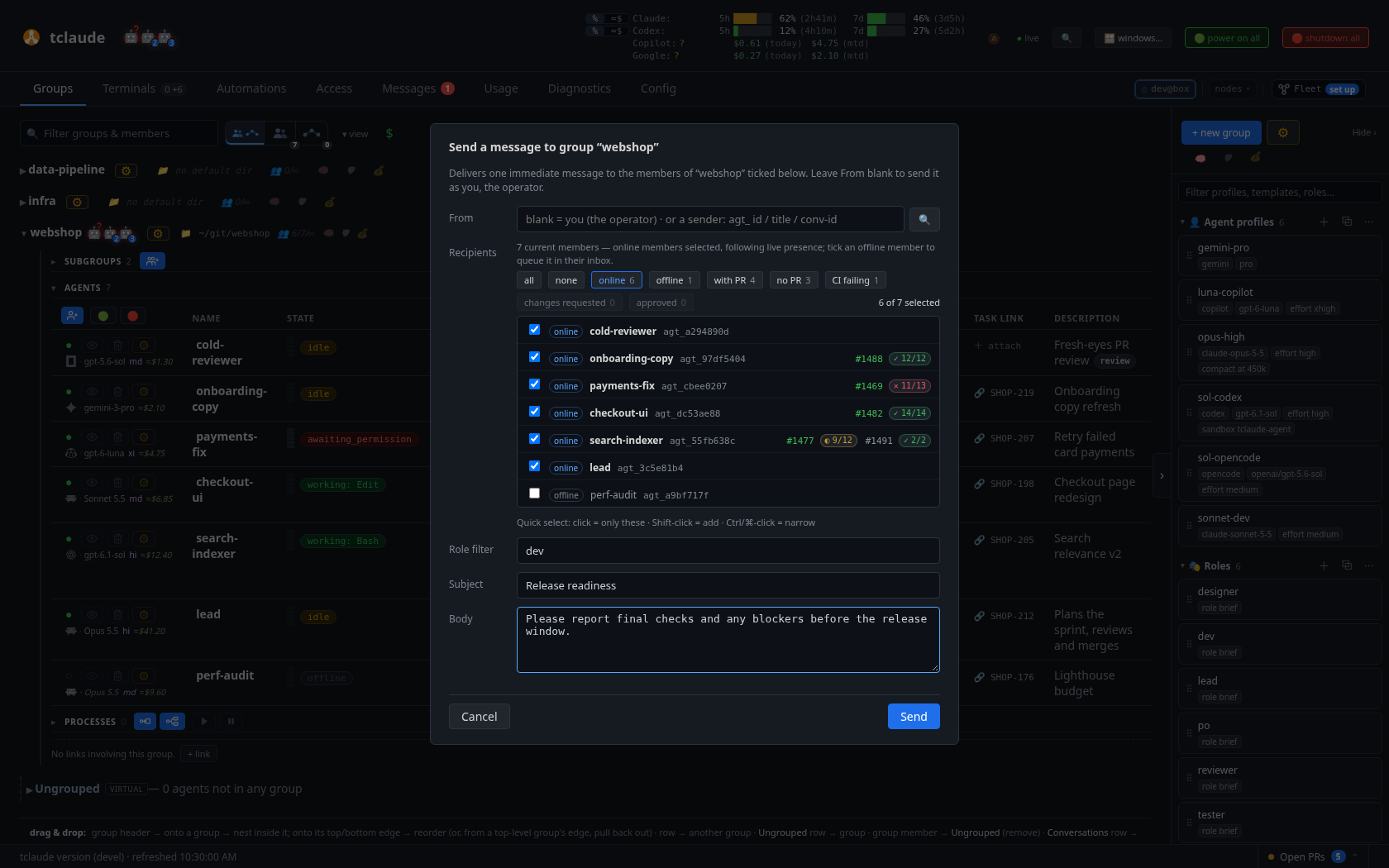
Composing a group multicast from the dashboard — sender, live membership tick-list, and a role filter
message (aliases msg, send) takes the body as positional text,
--body, --stdin, or --file — exactly one; --file sidesteps shell
quoting, including backticks. --subject and repeatable --cc behave as
you would expect; --gen pins a send to a specific past generation of the
target.
Direct sends are authorized by a shared group, ownership of a group
containing the target, or an inter-group link. The message.direct slug is
the off-group escape hatch, not granted by default.
Durable first, nudge second
Delivery is durable-first: the message row lands in SQLite before any attempt to notify the target. The tmux nudge — a line injected into the target's pane — is only a best-effort notifier on top. For an online target, the nudge worker resolves the target's current generation, waits while the pane's input is blocked (a nudge is never injected into a permission prompt), retries transient tmux failures, and picks inline versus pointer delivery. For an offline target, notification attempts for regular messages are discarded — no burst of stale nudges on resume — while the unread inbox row stays durable; lifecycle, process, and scheduler nudges stay queued instead.
Short printable bodies (up to agent.message_inline_max_chars, default
2000 runes) are delivered inline in the nudge and their inbox copy marked
read. Longer or control-character-bearing bodies get a pointer nudge
telling the agent to run inbox read <id>. Harnesses driven over an API
channel rather than keystrokes are notified over that channel, with no
keystroke fallback.
Backpressure: each target holds at most 10 unprocessed regular messages. A
direct send to a full target is rejected with queue_full and no row is
written; group and CC sends warn per full recipient and continue.
Multicast
Target group:<name> (or group:<id>, or bare group: when you are in
exactly one group) writes one message row per member other than the
sender. The sender must be a member or owner; --role R restricts
delivery to members with that role tag.
The inbox
tclaude agent inbox ls --unread
tclaude agent inbox read <id>
tclaude agent inbox sent
tclaude agent inbox prune
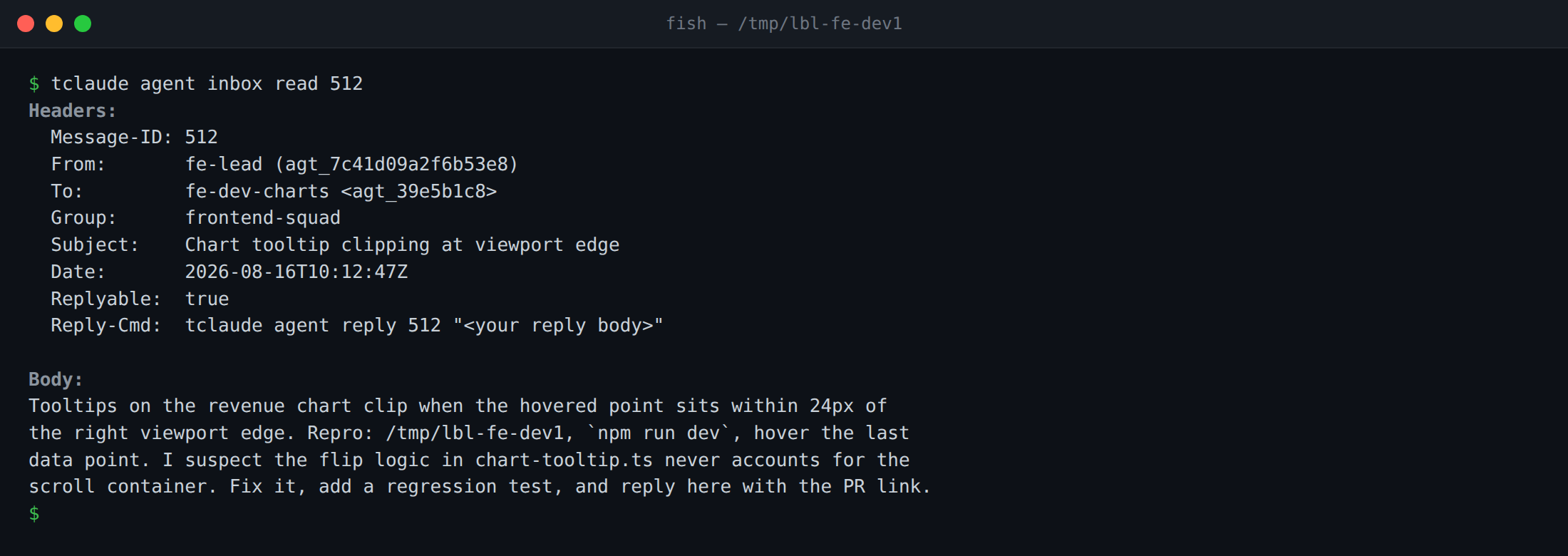
Reading a task brief from the inbox — the Reply-Cmd header tells the agent exactly how to answer
inbox (aliases mailbox, mail) lists, reads (RFC-822-shaped headers:
From, To, Group, Subject, Date, Replyable, Reply-To, Reply-Cmd), shows
your outbox (sent), waits interactively for the next message (watch —
an arriving inline message releases the watcher), and deletes old mail
(prune). Reading another agent's inbox (ls --target) needs
agent.inbox-watch or group ownership. reply <id> sends to the
message's Reply-To and inherits Re: <subject>.
notify-human
notify-human is the agent-to-human channel: the message lands in the
dashboard's Messages tab. It is permission-gated on the human.notify
slug — granted by default to no one, held by trusted coordinators — and
any group owner passes the gate too (that owner bypass is suppressible
with an explicit deny). An agent with neither can ask per-call with
--ask-human <timeout>, which raises an approval popup for the human.
--attach (repeatable, files or directories) works on notify-human. agent message
and agent reply take --attach too, for files you can read: at most 4 files and
512 KiB in all, images, text, data and PDF, to a local agent or a remote member@peer,
not to a group. The recipient gets its own copy, stored where no sandboxed agent can
reach it. The message names the file, and tclaude agent inbox attachment <id> saves it
(-o picks the path), for the recipient or the sender only. On notify-human, up to 20 files arrive as separate
downloads; more than 20, or a directory, become a single zip (--zip,
--separate, and --name control the shape). The body may be omitted
when --subject and --attach are both present.
Repeat --option to put a decision to the human instead of only telling
them something:
tclaude agent notify-human -s "Which layout?" "Mock attached." \
  --option Tabs --option Sidebar --recommend 2 --attach mock.png
A decision takes 2 to 6 single-line options, and --recommend marks the
one the agent suggests. The human answers with a button in the companion
window or the Messages reader, and the agent gets the pick as an inbox
message starting Decision: <option>, queued for it if it is offline. Only
the first answer counts.
What a spawned agent receives
A freshly spawned agent's first-turn welcome and inbox briefing are assembled by the daemon from, in order:
- The
[system: …]welcome — who the agent is, which group it is in, and thetclaude agentcommand surface. - The role brief, when spawned with
--role-refor a template role. - The spawn profile's
startup_contextsection, if any. - The group shared context (
groups set-context), unless the spawn opted out. - The task brief (
--initial-message/--file/ template spec). - The reply-to: the spawner by default, so the new agent's first
reply reaches its coordinator;
--reply-tooverrides, and human spawns default to none.
The briefing is always saved as an inbox row; when it fits under
agent.spawn_inline_max_chars (default 2000 runes) it is also inlined
into the launch prompt with the inbox copy pre-marked read, otherwise the
welcome points the agent at its inbox. Worktree path and branch ride the
welcome when the worktree lives outside the launch directory.
Note
This spawn briefing is unrelated to Claude Code startup-context
trimming (--context-features), which removes items from Claude
Code's own startup context and is covered in
Utilities.
Agents learn this command surface from bundled skills: tclaude setup
--install-agent-skills installs the agent-coord, agent-lifecycle,
human-notify, and related skills into ~/.claude/skills, shared
~/.agents/skills, and $CODEX_HOME/skills (default ~/.codex/skills).
Claude Code reads its own directory; Codex, Gemini, Copilot, OpenCode and
pi read the shared directory. Re-run setup after upgrading the binary.
OpenCode's OPENCODE_DISABLE_EXTERNAL_SKILLS disables shared-directory
discovery; remove that override to use the installed bundle.
Managed skills and rules
Operators can keep instructions in a tclaude-managed group or user library:
tclaude skills import release --group builders --path ./release-skill
tclaude rules add conventions --user --path ./rules.md
tclaude skills ls --group builders
tclaude skills show release --group builders
tclaude skills show release --group builders --path scripts/check.sh
tclaude rules show conventions --user
tclaude rules rm conventions --user
add and import both read an explicitly supplied directory (skills) or UTF-8
file (rules). Existing names require --overwrite. A skill directory must contain
SKILL.md and can include supporting files; symlinks, special files and suspected
credentials are refused. Limits are 1 MiB per stored item and 16 MiB per agent's
effective set. Library changes apply at the next launch or resume. Only the human
can change the library; agents can read user items and their own groups' items.
Managed instructions never automatically install into ~/.claude/skills,
~/.codex, ~/.agents/skills, project instruction files or global harness config.
Each managed agent launch gets a private instruction directory with read-only
files and an explicit sandbox read grant. The tclaude sandbox mounts it read-only;
harness-native enforcement follows that harness's filesystem policy. Claude
Code loads its skills as the tclaude-managed plugin when the installed CLI
supports --plugin-dir. pi loads the launch directory as a command-line package,
so a managed skill shadows a same-named ambient one, and appends the rules to its
system prompt. All harnesses receive skill paths in their startup briefing as
on-demand instructions. Rules are included in the briefing and
re-applied after compaction or clear. The launch snapshot stays frozen even when
the library changes. Group context opt-outs do not remove managed operator rules.
Group skills override same-named user skills. Different versions of the same skill in multiple groups refuse launch and name the conflicting groups. Rules are additive, deduplicated by content, and never grant permissions. Ambient harness instruction files are untouched and are not automatically imported.
Managed items travel with an agent in PAF hashed attachments. The receiving agent gets its own overlay; the receiver's rules remain additive and authoritative, and carried skills override same-named library skills for that agent only. Cloning creates an independent overlay, and reincarnation refreshes the next launch without deleting the predecessor's files before it stops. A harness that cannot bind a no-copy clone's identity refuses that operation with managed items; use a history-copy clone. Claude Code and OpenCode can (OpenCode's clone takes the id its managed server mints). On OpenCode the standing guidance arrives over the managed server, as the agent's first turn of the launch, on resume and clone too. One-shot runs with managed items refuse explicitly; use an ordinary worker.
Older receivers are refused only when managed items actually travel. A human can
explicitly omit them using --omit-managed-instructions on export, share, move,
teleport or import. Legacy v1 archives cannot carry them. Arrived items remain
agent-scoped; there is no adoption into the library in v1.
Scripts, executable files and skill hooks always require the receiving human's
approval for each transfer. Import preview lists the files and script text, and
returns managed_instruction_digest. After inspection, pass that exact value
with --approve-managed-scripts DIGEST when applying a PAF or incoming agent
bundle. A changed digest refuses; agent callers cannot approve. Peer auto-admission
does not skip this step. Alternatively, a human may omit the carried items;
receiver rules still apply. No automatic library or user-global install occurs.