Spawning and lifecycle
New to tclaude?
The tutorial Run a team through a lead walks through a first team step by step.
Agents create other agents, and someone has to keep that safe. This page
covers tclaude agent spawn, the seven guardrails that bound what a
spawning agent can create, the profile and role libraries that make spawns
repeatable, and the lifecycle verbs that manage an agent from birth to
retirement — including the --target manager pattern they all share.
Group membership, messaging, and what a spawned agent receives at startup are on Agents and groups.
Spawning an agent
tclaude agent spawn myteam --profile worker \
  --name reviewer-1 --role reviewer \
  --file brief.md --task https://linear.app/acme/issue/JOH-123
The daemon launches tclaude session new -d --global, waits for the new
conversation id to materialize, and adds it to the group. Spawning requires
the global agent.spawn or group-scoped groups.members.spawn permission —
human-only by default. Group ownership contributes the latter scoped to owned
groups, and the guardrails below still apply to agent callers. Grants for
either slug may be restricted to named spawn and sandbox profiles; a
sandbox_profile scope matches the profile the launch resolves to, which is
the inherited group or global assignment when --sandbox-profile is omitted.
An agent that belongs to exactly one active group may omit myteam in the
example above; the new agent joins that group. A human caller, or an agent
with zero or multiple active group memberships, must name the group. Archived
groups do not count toward the implicit choice. This also applies to one-shot
spawns.
The flags that matter most:
- Identity:
--name(becomes the conversation title; charset[A-Za-z0-9_-], 1–64 characters, auto-normalized),--role(free-text display and routing label),--role-ref(a saved role — brief plus baseline permissions, see below),--descr(one-line dashboard label),--task <url>and--task-label(the dashboard Task column link),--owner/--no-owner(owner spawns need agroups.owners.managegrant covering the target group: one scoped to a group mints owners in that group only, and owning the group is not enough). - Brief:
--initial-message, or--file <path>(-reads stdin; 16384-byte cap) for anything long, multi-line, or containing backticks.--reply-topicks who the agent's first reply reaches; it defaults to the spawning agent, and is empty for human spawns. With--harness shell, omit the brief to start an interactive shell. To run a shell command, use--non-interactivewith--initial-messageor--file. - Launch shape:
--harness,--model,--effort,--sandbox(harness-builtin mode),--sandbox-impl(OS containment — see Sandboxing),--ask-for-approval, and per-harness toggles (see Harnesses).--profilepre-fills all of these from a saved spawn profile — with a profile, usually no other launch flag is needed. - Environment: repeat
--env NAME=valuefor one-off process variables. Values may contain=and commas. These are ordinary configuration, not a secret store: they are visible in the dashboard and persisted with the agent's launch record. - Directory:
--cwd <dir>sets the launch directory, and a relative path means relative to where you ran the command. Without it the agent starts in the group's default directory, then your current directory. A sandboxed agent must be able to write the directory, so one that cannot reach the group's default is refused; it can pass--cwd .to stay where it is. - Worktree:
--worktree <branch>creates or reuses a git worktree on that branch and spawns the agent into it, in the repository of that same directory;--worktree-basepicks the branch it is cut from;--worktree-repocovers the monorepo case — the agent launches in--cwdand the worktree's path and branch ride into its welcome instead. The checkout runs in the daemon, and a rejected spawn removes a worktree or branch the daemon created for it. See Worktrees. - Attention:
--auto-focusopens a terminal attached to the new agent (off by default on the CLI; the dashboard spawn modal defaults it on).--no-group-contextskips the group's shared startup context for this one spawn.
How the new agent actually starts is harness-specific. Claude Code is
launched with the conversation id and welcome preset — no keystroke
injection. Codex receives the [system: …] welcome as its required
first-turn seed, with the title written to Codex's store out-of-band.
Either way the briefing lands durably in the agent's inbox — see
Agents and groups.
One-shot non-interactive spawn
Use --non-interactive to run one prompt, wait for completion, and print the
answer on stdout. A one-shot uses the group's launch settings but creates no
group member or persistent tclaude agent. The prompt must be supplied directly
with --initial-message or --file; it is passed
as the harness's initial prompt, not delivered to an inbox.
On Linux, each one-shot launches in a detached tmux pane under the same host
confinement as a normal agent. Its output is visible
in the pane while the run is active; the session closes when the run ends.
Linux one-shots require a working tmux server, as regular agent launches do.
--name is optional for a one-shot and names that tmux session (with a -N
suffix if the name is taken); without it the session is one-shot-<id>.
tclaude agent spawn myteam --non-interactive --file task.md
tclaude agent spawn myteam --non-interactive --harness shell \
  --initial-message 'printf "hello\\n"'
--timeout covers the entire run and defaults to one hour. The child's exit
status is returned to the caller; timeout exits 124. Group startup context is
excluded by default; --group-context includes it. A shell prompt is a shell
command, so --group-context is rejected for shell runs. Identity (other than --name),
messaging, interactive approval, and remote-control options do not apply to
this mode. Successful non-shell runs print stdout only; failed runs retain
stderr, and shell runs always forward both streams. The harness-native and
tclaude-layer sandbox implementations are
supported for Claude, Codex, and shell.
Linux resource-only launches require a temporary cgroup even without ceilings.
On Linux, a configured resource limit is applied through a temporary cgroup.
A configured resource limit also
refuses the run on macOS or when the Linux daemon lacks a delegated cgroup.
Sandbox-profile agent_directories receive fresh private per-run bindings and
writable grants. Ordered pre_launch blocks run after profile environment
export and before the harness, with the same authority as an interactive launch:
inside the outer sandbox for tclaude-layer, in the host bootstrap
shell for harness-builtin/resource-only. off omits sandbox profiles, as it
does for interactive workers, so profile setup is not applied. Bash is required for scripts;
a failed block aborts launch and names the block.
The existing process-group/cgroup reaper handles completion, failure, timeout,
and cancellation. Per-run directory cleanup waits for proof that descendants
have stopped. A delegated cgroup is used opportunistically even without authored
ceilings, and its removal permits immediate directory cleanup. Without that
proof, directories remain under the tclaude cache's agent-dirs/oneshot-* tree;
the command reports the retained path. A private cleanup journal under
~/.tclaude/data/one-shot-directories/ lets the startup/hourly sweep reclaim
abandoned cgroups and directories, or directories from a previous boot. On
macOS and Linux without delegation, these caches can accumulate until reboot;
operators may remove the reported tree and corresponding journal after all
descendants have stopped. Age alone does not prove that a process exited.
One-shots currently have no local gateway caller identity. Named HTTP proxy
URLs are omitted with a notice; model gateways refuse the run with guidance to
use an interactive worker. Managed instructions also require an interactive
worker. Selecting another --sandbox-profile adds to the global/group policy,
so it cannot remove inherited profile settings.
When --worktree is used, the worktree remains after the run so its changes
can be inspected.
Default resolution
Each launch field (--harness, --model, --effort, --sandbox,
--sandbox-impl, --ask-for-approval, --ask-user-question-timeout) is
resolved independently, highest tier first:
- the explicit flag
--profile(a named spawn profile)- the group's default spawn profile
- the global default spawn profile
- the harness's own default
Environment variables use name-by-name overlay precedence, lowest to highest:
sandbox profile, group, global default spawn profile, group default spawn
profile, explicitly selected spawn profile, and explicit --env / spawn-dialog
values. A higher tier replaces only matching names. Reserved launch-control
names (HOME, PATH, TCLAUDE_*, CODEX_*, and similar) are rejected.
The resolved common environment keeps profile and explicit per-spawn values as birth-time configuration. The group tier is re-read whenever tclaude creates a fresh process generation, so stop/resume, restart, clone, and reincarnate pick up current group environment settings while retaining the original higher-tier overrides. A process that is already running keeps its existing environment until one of those lifecycle actions.
What every relaunch (resume, reincarnate, clone, morph) does with each launch
field, and why, is listed in Launch resolution.
A spawn can override the global relaunch policy for its agent with
--relaunch-policy field=mode (repeatable) or --relaunch-policy-file, and a
spawn profile can carry the same rows; see
Per-agent overrides, which also
covers when an agent spawner needs relaunch-policy.manage.
Remote control, auto memory, peer messaging and group context
Four profile toggles — remote_control, auto_memory, peer_messaging and
include_group_default_context — resolve the same way on every spawn path:
a direct spawn, a template or task-force deploy, a scribe or Steward summon, a
trigger worker and a process worker. Highest first:
- the explicit flag (direct spawn only). The dashboard's spawn dialog
pre-fills the remote-control, auto-memory and peer-messaging checkboxes
from the tiers below and leaves one out of the request when you did not
change it and the daemon resolves the same value, so a box left as
pre-filled is not an explicit choice. To know what the daemon resolves,
the dialog asks it: a spawn preview (
POST /api/groups/{name}/spawn-preview, the spawn request's body) runs the spawn's own resolution and validation, stops before anything is launched, and answers with each launch field's value and the tier that decided it, including the relaunch-policy rows the agent would get (each with akind: explicit, profile or global). A box the daemon would not resolve the same way is sent as shown, and so is every box when the preview fails - the group's remote-control policy (
groups set-remote-control; remote control only) - the named profile (
--profile, a template agent's inline or referenced profile, a trigger action's or process node's profile) - the group's default spawn profile
- the global default spawn profile
- off — except the group context, which falls back to the path's own
default: included for direct spawns, deploys, trigger and process workers;
left out for scribes and
--non-interactiveone-shots. A deployed task force's mission is not part of the group context for this toggle: every member is briefed with it either way, like its role and process blocks (a--non-interactiveone-shot only when it includes the group context)
Remote control is honoured for unattended trigger and process workers too, so
a profile or group policy that turns it on makes those workers reachable from
the Claude app. A --non-interactive one-shot never gets remote control: it
has no session to control. A value derived from a policy or profile is dropped
for a harness with no Remote Access instead of failing the spawn.
The harness resolves through the full chain first; the other fields then validate against it. An incompatible explicit flag is a loud error; an incompatible value from a lower profile tier is skipped, falls through, and is disclosed in the resolved-shape echo.
Warning
A spawn profile carries its own harness, so leaving --harness unset
is not the same as Claude Code: a group or global default profile
that selects Codex sends a no-flag spawn to Codex, on that profile's
model. When policy requires a specific vendor or model, pin it with
explicit --harness and --model, or a --profile that pins them.
The spawn output echoes the resolved Harness/Model/Effort and where
each came from; inspect the ambient defaults with
tclaude agent profiles default show and tclaude agent groups ls.
The seven spawn guardrails
A human spawning agents is one thing; agents spawning agents is where things can run away. Seven checks bound every agent-initiated spawn. The human bypasses the agent-only ones — but not all seven are agent-only.
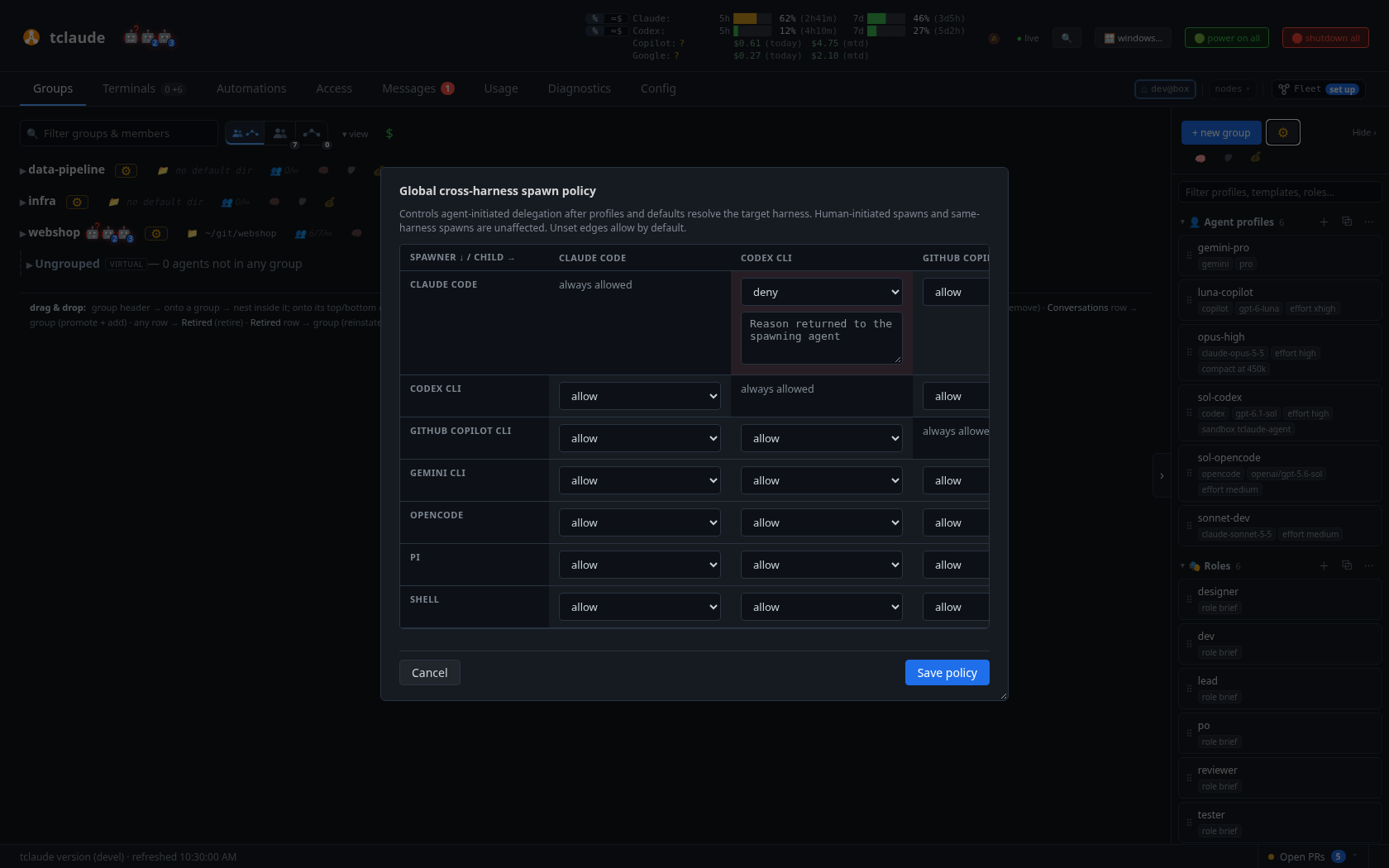
The global cross-harness spawn policy matrix: which harness may spawn which, with a reason returned to the refused spawner
1. Group restriction. An agent may only spawn into a group it belongs
to or owns (403 group_restricted). Config:
agent.spawn_group_restriction, agent.spawn_allowed_groups.
2. Rate limit. At most 10 spawns per agent per rolling hour by default
(429 rate_limited; agent.spawn_max_per_hour). A runaway loop stalls
instead of forking exponentially.
3. Cross-harness matrix. Whether a Claude Code agent may spawn a Codex
worker (and every other directed pair) is an operator decision: a global
matrix with per-group overrides, and denials carry the operator's stated
reason (403 cross_harness_spawn_denied). The matrix covers every spawn
path — direct, template, wave, process, scribe, and clone.
4. Sandbox lineage. A child may not launch under a weaker sandbox than
its parent (403 sandbox_restricted). Confinement can only ratchet down
the tree, never widen. Launches under tclaude’s sandbox are
classified by their real confinement, not the off or
danger-full-access value recorded for the inner harness. See
Sandboxing.
5. Approval lineage. A child may not auto-accept a broader class of
actions than its parent: each approval posture maps to a capability set
(auto-edits, auto-commands, machine-reviewer, unreviewed), and the child's
set must be a subset of the caller's (403 approval_restricted). A child
posture left unset is narrowed to the caller's own same-harness posture
rather than failing; an inherit parent may mint an exactly-inherit
child. Claude auto may also mint Copilot yolo: supervised auto has no
one-to-one Copilot mode, and sandbox lineage separately bounds the child's
file access. One residual gap is documented: the guard compares requested
postures, so a parent that can write the child's working directory could
widen the child's effective posture through its settings file — bounded in
practice by sandbox lineage, which governs who can write where.
6. Directory write-proof. A sandboxed agent must prove it can write
every directory the spawn would give the child write access to — the
launch directory, the worktree, and the repo root plus its git admin
directory. The mechanism is a challenge handshake: the daemon rejects the
first attempt with a single-use token and the list of directories, the
caller creates a .tclaude-write-proof-<token> file in each, and
retries; the daemon verifies and re-verifies the proofs immediately before
forking the session. The elegance is that the caller's own sandbox
answers the question. The daemon never has to parse or trust a sandbox
profile to know what the caller can touch: if the caller's confinement
forbids writing a directory, the proof file simply cannot be created, and
the spawn fails closed. The CLI answers the handshake automatically, so an
authorized caller never sees it. Exempt: humans, unconfined parents, and
Codex read-only children.
7. Group size cap. A group's set-max-members limit is enforced at
spawn (409 group_full) — and unlike the six above, it binds the human
too. See max members.
Guardrail denials, like all permission denials, land in the audit trail — see Permissions and audit.
Capacity limits and the spawn queue
An instance can cap how many agents it runs at once and require free RAM and
disk before it launches another. Configure capacity in
~/.tclaude/data/config.json:
{
  "capacity": {
    "max_live_agents": 8,
    "min_free_ram_mb": 4096,
    "min_free_disk_mb": 10240,
    "when_full": "queue",
    "max_queued": 50
  }
}
Everything is off by default: with no capacity block nothing is limited and
nothing changes. Each field is independent; zero or omitted disables it.
max_live_agentscounts managed agents with a live pane, plus reservations: spawns still starting up, undecided or launching federation spawn requests, running remote jobs and incoming teleports. Plaintclaude session newpanes and non-interactive one-shot runs do not count. The olderfederation.max_live_agentsis the same cap and still applies whencapacity.max_live_agentsis unset.min_free_ram_mbis free (available) memory, andmin_free_disk_mbthe free space on the data directory's and the launch directory's filesystems. Both are read fresh when a launch is admitted. They only gate new launches and never stop running agents. A reading that fails counts as not enough, with the reason in the refusal.when_fullisrefuse(the default) orqueue.
With refuse, a spawn past a limit fails with 409 node_busy and the reason,
for example free RAM 512 MB is below capacity.min_free_ram_mb 1024.
With queue, a spawn from tclaude agent spawn or the dashboard spawn dialog
that does not fit waits in one first-in-first-out queue instead. It returns
202 with its queue ID and position, and there is no ETA:
Queued spawn #12 in group "builders" at position 2 (no ETA): node capacity reached: 8 of 8 live and reserved agents
While spawns wait, a new spawn queues behind them even if a slot is free, and other launch paths whose capacity no earlier reservation already counts (triggers, templates, waves, process steps, AWB pickups, agent imports) are refused rather than jumping the line. Approved federation spawn requests and incoming teleports reserved their place when admitted and are not held back. When capacity frees, agentd launches the head entry, then the next, in order. The launch replays the stored request as the original requester, so permissions, group membership, group state and profiles are checked again at launch time. A requester agent that was retired, or that left the target group while its spawn waited, fails the entry with that reason; no other identity stands in. The requester is told the outcome: an agent through its inbox, the operator in the dashboard Messages tab.
A spawn that holds one-time authority cannot wait and is refused even in
queue mode: one approved by a single human --ask-human decision, one
authorized by a sudo grant use, one carrying attachments, external steward
spawns, and spawns made on a peer's behalf. Directory write-proofs are checked
when the spawn is queued; the launch accepts only the same canonical
directories. tclaude agent spawn --no-queue refuses instead of queueing, and
tclaude --join-group never queues because it attaches at once.
max_queued (default 50) caps waiting spawns; past it the spawn is refused
with spawn_queue_full.
tclaude agent queue ls          # capacity, used/max, and waiting spawns with positions
tclaude agent queue ls --all    # also ended entries kept for a week
tclaude agent queue rm 12       # cancel a waiting spawn
Spawn requests from federation peers share this queue; see
Automatic worker placement for how they wait and are handed on. Remote
one-shot jobs are not queued: a full node, or one with spawns waiting, refuses
them with node_busy.
tclaude agent ls lists waiting spawns under the agent table, and the
dashboard shows them in the Spawn queue
block above the groups. An agent sees
its own queued spawns and those targeting a group it is in; the operator sees
all. A waiting spawn can be cancelled by its requester, an owner of its target
group, or the operator. Listings show only the name, group, requester,
position and age, never the stored request, which may hold environment values.
That request stays in the private database and is deleted when the entry
launches, fails or is cancelled. The queue survives daemon restarts; an entry
left mid-launch by a crash is settled from the launch's own records rather than
launched twice. Queueing and cancelling are audited, and so is each launch the
queue makes, as spawn.queue.launched or spawn.queue.failed.
Spawn profiles and roles
Two libraries make spawns repeatable instead of flag soups. Reads are open
to every agent; writes are gated (profiles.manage, roles.manage) and
effectively human-only by default.
A profile can be any group's default, or the global one, and a default reaches every spawn there, trigger, schedule and process workers included. So an agent writing a profile or role may only add access it could confer itself, on top of the library slug:
- A permission grant, set as a profile's
permission_overrides, or reached through a role the profile names, or in a role's own permissions, takespermissions.grant, and no wider a scope than the agent's own. is_ownertakesgroups.owners.manageunscoped, since the profile can reach any group.- Setting the global default profile takes the same authority over everything that profile confers.
Only what a write adds is checked. Editing a profile's description or model, or a role's brief, needs nothing more even when the profile or role already grants, and a deny never needs authority. Imports (profile, template and config bundle) are writes too. The operator is never refused.
Spawn profiles (tclaude agent profiles ls|show|create|edit|rm|
disable|enable|default) are named bundles of the whole spawn dialog:
launch shape (harness, model, effort, sandbox, approval, per-harness
toggles), identity (agent_name, role, role_refs, descr,
initial_message, startup_context), and birth-time access (is_owner,
permission_overrides). They are JSON-authored. profiles default
show|set|clear manages the global default profile that sits at tier 4 of
the resolution chain. A disabled profile fails spawns loudly
(profile_disabled, with the operator's reason) rather than silently
falling through, and a profile marked operator_only refuses
agent-originated use. Birth-time access is resolved against the caller's
own authority: a named profile the caller cannot honor is a refusal, while
an ambient default profile's unauthorized access fields are skipped and
disclosed.
Roles (tclaude agent roles ls|show|create|edit|rm) are named
bundles of a canonical role brief — prepended to the agent's startup
context — plus a default permission set. Reference one with --role-ref,
from template specs, or from a profile's role_refs; it resolves at spawn
time, and rm is refused while anything references the role.
Group templates and task forces build whole rosters out of these — see Teams at scale.
Promote
tclaude agent promote <selector> enrolls an existing plain conversation
as an agent, and also reinstates a retired one. Authorization:
agent.promote, or groups.members.promote under the manager pattern
below.
The manager pattern
Every lifecycle verb defaults to acting on the calling agent itself, and
most accept --target <selector> to act on another agent. The
authorization rule is uniform, and this is its one canonical statement —
other pages link here:
- Acting on yourself needs the matching
self.<verb>slug. The standard set is granted bytclaude setup --install-default-agent-permissions; the one exception is self-reincarnation, which needs no slug at all. - Acting on another agent needs either the global
agent.<verb>slug, orgroups.members.<verb>with scopes covering every active group the target currently belongs to. If any one of the target's groups is uncovered, the check rejects atomically. Archived and historical memberships are ignored. - Ownership contributes the group-scoped
groups.members.<verb>slugs for owned groups — so a group owner can manage members whose only groups it owns, without any explicit grant.
The every-group rule is what makes it safe: an agent in two groups cannot be stopped, renamed, or retired by a manager who only has authority over one of them.
Most verbs also take --ask-human <duration> (capped at 300s; timeout is
a deny) to escalate a denial into a dashboard approval popup — see
Permissions and audit.
Lifecycle verbs
rename
tclaude agent rename "<title>" retitles a conversation through the
harness-appropriate path (Claude Code: /rename injection; Codex: title
store; Copilot API drive: typed call). The title charset
([A-Za-z0-9_\-\[\]{}() ], max 64) is a hard security gate, because on
some harnesses the title becomes keystrokes. --auto instead queues an
inbox instruction asking the target to name itself.
compact and context-info
compact [follow-up] injects /compact, with an optional follow-up
message queued after it (timing best-effort). In the dashboard, compact in
an agent's ⚙ menu does the same with no follow-up, after a confirmation. It
shows only for harnesses that can compact and is disabled while the agent is
offline. context-info reads the
context meter (populated by the status line) for yourself — ungated — a
--target, or a whole team at once with --group.
reincarnate
reincarnate <follow-up> replaces an agent with a fresh successor: the
daemon spawns a new session, migrates the identity — the stable agent id,
groups, grants, ownerships — onto the new conversation, and soft-stops the
old one. The follow-up argument is required, because the successor starts
with a clean context window and would otherwise sit idle. The daemon
migrates identity, not work: persist task state to a handoff file before
reincarnating. Self-reincarnation is the one lifecycle action that needs
no permission slug. It is primarily a Claude Code tool for context
pressure; Codex agents should run on and let native auto-compaction do its
job. Cross-agent handoffs record the caller as the originator.
morph
morph [agent] --model M --effort E --ask-for-approval A (or --profile P)
relaunches an agent in place with a different launch form within the same
harness. The daemon rewrites the agent's durable relaunch profile and resumes
the same conversation, so the agent keeps its id, history, inbox, groups and
permissions, and gets a short inbox note saying what it was and what it is
now. Tools, the AskUserQuestion timeout and the auto-compact window are
morphable too; sandbox settings, working directory, drive and model proxy are
not.
--harness H (or a spawn profile for another harness) moves the agent to
another harness. Its conversation is translated into a new native conversation
of that harness (see
cross-harness history translation),
the agent is rebound to it as its next generation, and the new harness resumes
it. The agent keeps its id, inbox, groups and permissions, and its note
summarizes what the history kept and lost. --dry-run shows that report before
anything changes.
--history picks how the conversation is carried:
auto(the default) installs the translated history natively. If that fails, the new conversation points the agent at the history saved as files.summaryalways asks the source agent for a summary of the earlier work first, as a large cut does automatically.truncatecuts without a summary, whatever the size of the cut; the carried notice names what was cut and where the full transcript is.context-filealways uses the files.handofffirst asks the agent, through its inbox, to write a handoff for its successor and submit it withtclaude agent morph-handoff -f <file>. The morph applies once the handoff is in and the agent is idle. The translated transcript is still kept beside the handoff. If no handoff arrives within 30 minutes, the morph goes ahead with the files instead, stopping the agent if it is stuck.
A history tclaude cannot read leaves the handoff as the only option, so a live agent is asked for one automatically. An offline agent with an unreadable history cannot be moved.
--target-window, --history-budget, --keep and --cut-first override how
much history is carried and what is shortened first (see
carry-over overrides). The
dashboard's Morph dialog has the same choices under History carry-over.
--backup keeps the agent's current form as a separate agent before the morph
applies: a clone on the same harness, model and profile with the history as it
stands, named <name> (pre-morph backup) and stopped. It is standalone, with
no group memberships, permission overrides or group ownerships: two live
identities in the same groups would both receive group mail and could both act
on the same work. Wake it to use it, and add it to groups by hand if wanted. A
backup needs a live agent, because the clone is copied from the running one,
and if it cannot be made the morph does not go ahead. An agent asking for a
backup also needs clone authority over the target (self.clone for itself,
agent.clone or groups.members.clone for another agent).
--trust-dir, or trust_dir on the destination spawn profile, seeds the new harness's folder-trust
record for the working directory, so the relaunched pane does not stop on that
harness's trust dialog.
Launch posture does not map across harnesses, so the new form is explicit: the
approval posture must come from the profile or --ask-for-approval, model and
effort default to the new harness's own, and the drive starts at its defaults.
tclaude's own sandbox layer (tclaude-layer) carries over unchanged. A sandbox
that is the harness's own has no counterpart elsewhere, so only the operator
can move such an agent, and its new mode comes from the profile or the new
harness's default. An agent caller must use a spawn profile for the new
harness, without overriding its fields, and may not widen the target's sandbox
or approval posture. An agent with a model proxy route or a temporary sandbox
unlock cannot change harness. --back returns to the previous harness through
the same translation. The preview (--dry-run, and the dashboard's Morph
dialog) names both sandbox layers: tclaude's own sandbox, which a morph never
changes, and the new harness's built-in mode, which under tclaude's layer runs
inside it. It warns only when nothing confines the agent after the morph.
An idle or offline agent is morphed at once. A busy agent gets a pending morph
(shown in agent ls, whoami and the dashboard) that applies when it next
goes fully idle, or expires after 30 minutes. --now stops a busy or stuck
agent immediately and resumes it from its last durable history. --back
restores the form the last morph replaced, --cancel drops a pending morph,
--dry-run previews the change, and group:<name> morphs every other member
of a group with per-agent results.
Morphing yourself needs self.morph (not default-granted, not conferred by
ownership) and always waits for your current turn to end. Morphing another
agent needs agent.morph, or groups.members.morph covering every group of
the target, which group ownership contributes. A grant scoped to
spawn_profile allows only --profile morphs into those profiles. An agent
may not morph a target into a broader approval posture than its own.
clone
clone [follow-up] forks an agent into a sibling that inherits its
identity (groups and roles, grants) while the original keeps running.
The sibling is renamed <title>-c-<N> and gets a copy of the conversation
by default (--no-copy-conv for a blank-context sibling). The copy works for
every harness with portable history: Claude Code copies its transcript and
side files natively, and Codex, OpenCode, Copilot, Gemini and pi go through the
same history export/import as a cross-node move, landing in the clone's own
harness state (a private CODEX_HOME or OpenCode state included).
The identity copy is all-or-nothing: if any membership, grant or ownership
cannot be written, the clone is stopped and the command fails, so a clone never
runs with only part of its source's identity. Group ownerships are not copied
unless you pass --copy-ownership (memberships, roles and grants always are). --group <name> also adds the clone to one more group in the same
request; an agent caller needs groups.members.add for that group, just as
for adding a member directly. That clone launches under the group's sandbox
profile and environment from its first launch; --keep-sandbox and
--keep-environment keep the source's instead (the dashboard's clone dialog
offers the same as checkboxes). Its handoff message says which group each
comes from. A groups clone launches every member under the new group's.
--cwd <dir> starts the clone in another
directory, typically a git worktree; an agent caller must prove it can write
there. A clone records no spawn lineage, so @self-spawned and @descendants
grants never reach it through the agent that cloned it. It does carry its
source's launch record: what the source set explicitly at spawn stays explicit
for the clone, a re-applied spawn profile treats both alike, and after a
compaction the clone is re-briefed as its source would be (the same group
context choice and profile startup context).
Agent-initiated clones are rate-limited by the daemon's clone cooldown (default one minute).
seance
seance [question] asks a dead predecessor one question: the daemon
resumes the retired incarnation headlessly for a single turn and returns
only its answer — nothing is reanimated. --back N walks further up the
chain; --target consults another agent's predecessor or an exact dead
generation; --model/--effort pick the medium; --print-cmd dry-runs
for free. Turns are capped at 10 minutes, are billable, and need the
predecessor's launch directory to still exist.
stop and resume
stop <selector> soft-exits the target's session, escalating after about
ten seconds through pane kill, SIGTERM, and finally SIGKILL of the frozen
pane's process group, re-checking identity at each step. Idempotent;
--force skips the soft phase and kills the pane at once, and the same SIGTERM
and SIGKILL follow in the background if the pane does not go.
resume <selector> relaunches an offline agent into its recorded working
directory. If that directory has vanished, resume fails with
error:missing_cwd (--recreate-dir is human-or-approved-only), and
malformed or tampered directory provenance fails closed. Managed Codex
agents also auto-recover from crashes with exponential backoff.
retire, reinstate, delete
retire <selector> soft-deletes an agent: memberships dropped,
permissions and sudo revoked, the conversation kept and reinstatable. By
default it also soft-exits the live session (--no-shutdown keeps it) and
removes the agent's linked worktree and branch (--no-delete-worktree;
the main repo and shared worktrees are always kept). The branch is deleted
only when it is merged: a branch with commits that main or master (locally
or on origin) does not reach is kept, and the outcome says how many. --reason is
recorded.
Retire also takes what exists only for the agent and repairs what it shares:
- It removes the agent's own cron jobs, standing orders and automations (trigger rules), plus the cron jobs and standing orders addressed to it.
- It cancels the process runs scoped to it.
- It clears template steps pinned to it. Those steps go back to their role,
or to nobody yet, saved as a new template version with the note
"cleared
after it was retired". A step pinned to an agent is cleared only when the operator retires it, or an agent with process.templates.managedoes.
--keep-dependents keeps all of that instead. The cron jobs and standing
orders the agent owns are then disabled, and a reinstate does not turn them
back on.
Either way, a running step the agent held falls back to its If-nobody rule
right away. The outcome lists what went. In the dashboard, the retire and
delete dialogs, single and bulk, list what would go with a checkbox that is
checked by default. Unchecking it is --keep-dependents. For an agent on
a linked node, the dialog says the cascade happens on that node; keeping
them is only possible from there.
reinstate <selector> returns a retired agent to active status — old
memberships and grants do not come back. Authorization is
agent.promote or ownership.
delete <selector> is the permanent wipe: all database rows, the
transcript, the session token. It first retires the agent, with the same
cascade (--keep-dependents applies here too, though its cron jobs go with
its rows either way). It refuses while the tmux session is alive
unless --force, requires agent.delete (not granted by default) or
group ownership, and refuses self-deletion (use tclaude conv rm).
Retirements and deletions from before the cascade, and ones that kept their
dependents, leave rows that still refer to the agent. Doctor counts them.
tclaude agent cleanup-dependents --orphaned removes them, as retiring the
agent today would: it removes the cron jobs, standing orders and automations,
cancels the runs, and clears template steps pinned to the agent by id or
conversation. A step pinned only by the name of an agent retired earlier is
left as written, because a later agent may answer to that name. Run it with
--dry-run first to list what it would do. It is the operator's own: an
agent cannot run it. An agent reinstated in the meantime keeps everything,
and so does one away on a federation peer: it is not gone. The command exits
non-zero when it skipped an agent or left a warning.
dir
dir [selector] reports the directory an agent is working in — the
current dir by default, --start for the immutable launch dir,
--worktree for the repo root. --open opens a terminal there via the
daemon, and --repair recreates your own deleted startup directory
(self-only, self.dir-repair, at a daemon-selected path).
Other verbs
remote-control [on|off|toggle|status]toggles Claude Code Remote Access on an agent;statusreads the live pane and self-heals the tracked flag. Claude Code only — see Remote.interruptinterrupts an active Codex app-server turn;codex-app-server statusshows drive diagnostics.sandbox show|set(formerlysandbox-impl, now a deprecated alias) reads or assigns the durable sandbox implementation and sandbox profile an agent relaunches under;set --restartapplies it to a running, idle agent by stopping, assigning and resuming it. Its slug (agent.sandbox-impl) is deliberately not owner-conferred and not default-granted — effectively human-only. See Sandboxing.
Cross-cutting conveniences that ride on the same identity — head aliases,
tags, task links, present-pr, exports, and the human-clipboard bridge —
are covered in Teams at scale.
Diagnosing slow startup
Enable Config › Logs & housekeeping › Logging › Startup timings and save, or set
"startup_timing": true in ~/.tclaude/data/config.json. Changes apply to new
traces immediately, without restarting agentd. Traces already running finish
with the setting they started with, preserving complete measurements. The
session wrapper reads the same config, so new launches also pick up changes.
Install both binaries from the diagnostic branch with go install . ./cmd/...
and restart the daemon once to load the updated code. Subsequent setting
changes need no restart.
The legacy TCLAUDE_STARTUP_TIMING=1 environment switch still works when the
config key is absent. An explicit config true or false overrides it; saving
the dashboard checkbox writes an explicit value. The checkbox displays the
saved config value, not an inherited environment setting.
Filter the dashboard's Diagnostics › Logs view for startup timing, or inspect those JSON
records in ~/.tclaude/data/output.log. These are info-level records, so no
log-level change is needed with the default configuration. Each record has a
component, process ID, per-process trace number, milestone, total elapsed_ms,
and step_ms since that trace's previous milestone. Labels join the daemon
and session wrapper; child_pid joins wrapper dispatch to session_new and
effective-config probes. Conversation IDs join background enrollment/post-init
and Codex bootstrap. Traces overlap: do not add their totals together. A
return milestone means the function exited, not necessarily that startup
succeeded; check the readiness/failure fields and adjacent error logs.
Useful boundaries:
spawn_requestincludes request validation and daemon preflight;spawnmeasures launch preparation and conversation polling.spawn_wrapperrecords the child PID;spawn_wrapper_exitincludes the wrapper's wait duration.session_newseparates launch preparation, Codex version checking, tmux creation, and pane/directory gates.codex_effective_configseparates launching the preflight Codex app-server, waiting forconfig/read, and process teardown. This probe runs separately from the agent's actual Codex process and can occur in either daemon or wrapper.codex_requirementsis the same for theconfigRequirements/reada Codex launch indanger-full-access(harness-builtin,offorresource-only) makes, bounded at 10s, to learn whether managed requirements keep Codex's own sandbox on.codex_bootstrapseparates version/PID availability, listener ownership proof, the TUI's thread binding, client initialization, and verified readiness.codex_await_ready,spawn_backfill, andspawn_post_initcover later work.
An asynchronous spawn response can precede readiness: Codex's inline response window is 750 ms, and conversation-store discovery starts after a 1-second grace with scans at most once per second. The timings measure tclaude's observed milestones, not Codex's internal plugin/MCP initialization or first model-token latency. A long wait for TUI binding narrows the investigation to that interval but does not establish which Codex subsystem caused it.
Uncheck Startup timings and save (or set "startup_timing": false) to
disable new traces, even if the environment switch is enabled.
Timing records contain identifiers and durations, not prompts, environment
values, provider config, or capability tokens.
Startup timing details also include:
spawn_dialog: browser-measured offsets from the Spawn click through preparation (including auto-name confirmation), worktree resolution, attachment upload, request dispatch, response receipt, and dialog close request. All*_msvalues are cumulative; subtract adjacent values for phase durations.elapsed_msends at the close request, not the browser's next paint. Reports arrive asynchronously after closing, so their log timestamp is the receipt time. Failed submits reportsubmit_failedand may lack later milestones (shown as zero). Validation rejections and canceled auto-name confirmations do not report a completed submit.spawn_discovery: each conversation-store scan, with the launch label, time since launch, store-list duration/count, and whether a conversation matched. The one-second initial grace and scan interval remain unchanged.spawn_post_init:pane_aliveis distinct from keystroke settling and control readiness. Codex skips the fixed settling sleep when its welcome arrived through the launch seed or its app-server provides explicit control readiness. Legacy keystroke welcome delivery retains the settling delay.
For newly created worktrees, spawn_dialog also reports worktree_http_ms
(the worktree POST through response parsing), worktree_progress_cleanup_ms
(waiting for the progress poll to stop), and worktree_total_ms. These three
are durations, unlike the cumulative click offsets above. They are zero when
no worktree creation ran during that submit, including reuse of a cached result.
The worktree_progress_id joins that browser report to daemon records:
worktree_request: repository resolution, fetch phase, creation phase, and response handling.worktree_fetch/worktree_fetch_isolated: upstream resolution, proxy session setup, remote resolution, isolated transfer-repository creation, ref seeding, network fetch, ref import, and cleanup.worktree_create: config-lock inspection, initial worktree add (including Git's automatic tracking setup), explicit upstream repair, retry waits, checkout retries, and fallback without tracking.
Each trace's step_ms covers work since its previous milestone. Nested traces
measure overlapping work, so do not sum their totals. Git errors still appear
through the existing error paths; timing records contain no URLs, credentials,
repository paths, or Git output. A return milestone alone is not success.