Processes
Processes are reusable, versioned workflow templates — task chains, decisions, parallel fan-out, retries, human approvals — authored once and executed as daemon-owned runs with durable state and an auditable evidence trail.
The runtime is partially implemented: a substantial subset of the engine is live, and the rest of the CLI surface is stubbed. This page states exactly which half is which.
Not tclaude agent process
tclaude agent process shows and advances a group's advisory phase list
from a task-force template — a checklist for coordination, never enforced.
That is a different feature; see Teams at scale. This
page is about tclaude process: executable templates run by the daemon.
Start here
- Create a template under Automations › Processes, or let Edit with agent draft it. Or, in a group's Resources section, the + menu › ◈ New process opens a new one in place.
- Start a run from a group's Resources section: the + menu › ▶ Run a process….
- Follow it in Groups.
In the dashboard covers all of this. The next sections are reference for the format, the engine and the CLI.
Built-in ways of working
tclaude ships seven processes in the binary:
| Id | Name | Steps |
|---|---|---|
plan-vet-build |
Plan → vet → build → review → merge | the lead frames the task, a planner plans it, a usability vet checks the plan, a developer builds it, two reviewers who did not build it both approve, and the lead who framed it merges (the example) |
build-review-ship |
Build → review → ship | a developer builds and opens a PR, a reviewer who did not build it approves or sends it back, and the lead ships it |
bug-fix |
Bug: reproduce → fix → verify | a tester reproduces the bug, a developer fixes it, the same tester verifies the fix, and the lead merges it |
quick-change |
Quick change + one review | a developer makes the change, one other reviewer approves or sends it back, and the developer merges it |
plan-fan-out |
Plan → fan out → integrate | the lead splits the task into three parts, three different developers build one each at the same time, and the lead integrates them |
ask-me-first |
Ask me first | you give the go-ahead, a developer does it, and you accept it or send it back |
check-fix |
Check → fix if red | good on a schedule: a tester runs the checks, and when they are red a developer fixes them and the same tester checks again |
Each takes the task it is run for. Steps pick members by role (planner,
ux, dev, reviewer, tester) and spawn one when the group has none. The
lead's steps go to the group's lead (a member with the role lead, else an
agent that owns the group) and wait when it has none. Running out of rounds,
or a performer choosing escalate, fails the run, so a board task it runs for
is blocked with the reason; only your own stop or reject in Ask me first
cancels one. Plan → fan out → integrate has no decision to escalate from: a
part that fails blocks its branch, and the overseer is told once the step
has been stuck past its patience. Check → fix if red takes what to run as its
task (a schedule passes it, for example --param task='make test'). Each names the group's lead as its overseer (overseer: lead),
and a step stuck longer than its patience (an hour; two for building or
fixing) raises a concern to it (see
Oversight and escalation). Your own decisions in
Ask me first wait for you as long as it takes.
A built-in is never run as it is. A group that uses one gets its own copy: a template saved to the group (not published to the library), with its own id. The group's edits stay with that copy, and using the built-in again makes another copy.
- In the dashboard, a new process offers them first in its Start from row, before ✨ Describe it, ↥ Import .pwf and More ways of working › (the library).
- From the CLI:
tclaude process templates builtin ls, thentclaude process templates builtin use <id> --group <group> [--name <name>], which prints the copy's template id to run withtclaude process run. This takes what saving a process to the group takes (process.templates.manage). - The API:
GET /v1/process/builtins,GET /v1/process/builtins/{id}andPOST /v1/process/builtins/{id}/usewith{"group": "...", "name": "..."}.
Authoring templates
Templates are YAML documents with apiVersion: tclaude.dev/v1alpha1 and
kind: ProcessTemplate. The primary authoring surface is the dashboard's
Templates library and drag-and-drop editor, which covers parameters,
performers, edges, layout, snippets, version history, authorship, and
source-hash CAS checks. Agents author the same templates from the CLI:
tclaude agent process-templates ls [--json] [--library]   # group drafts included unless --library
tclaude agent process-templates show <template-id>
tclaude agent process-templates validate --file template.yaml
tclaude agent process-templates save --file template.yaml \
    --expect-source-hash <hash>
Saves are compare-and-swap: --expect-source-hash must match the current
stored version, so two writers cannot silently clobber each other — a stale
hash is a refused save, and the caller re-reads with show and merges. The
bundled process-templates agent skill and the CLI's --help are the deep
reference for the authoring shape and the safe show-edit-validate-save loop;
this page does not repeat them. The bundled process-runs skill is the agent
reference for starting, watching and steering runs (see Running).
Two permissions govern authoring, and neither executes anything:
process.templates.read— list, show, validate, export. Installed as an ordinary agent default bytclaude setup --install-default-agent-permissions.process.templates.manage— save, import. Never a default.
A template pinned to a group is also one of that group's resources. Its
members, with neither slug, list and show it (groups.resources.read, which
membership confers), and save a new version of it (groups.resources.write)
when they are members of every group it is pinned to: a save changes it for
all of them. Creating a template, deleting one, its library listing and its
pins stay process.templates.manage's, and a lock on the template refuses a
member's save as it does any agent's. See
Drawing boards › Group drawing boards are their members'
for how the membership source works.
Pins say who edits a template, not who runs it: a run in any group may start
any template, and a subprocess without a pinned version follows its head. So
a member's save also changes what later runs of that template, elsewhere,
execute. Program steps still need --authorize-program-profile when a run
starts, so a save alone runs nothing on the host.
Sharing workflows
A process can be shared as a .pwf file that carries the template and every
template its subprocess steps reference:
tclaude agent process-templates export <template-id>     # writes <template-id>.pwf
tclaude agent process-templates inspect <file.pwf>       # offline check and summary
tclaude agent process-templates import <file.pwf> --yes  # review, then import
Importing stores templates and never starts a run. The review lists every
command the workflow would run, the roles it asks for and the signer, and an
--ask-human popup shows the human the same review. See
Portable Workflow Format.
In the dashboard, share downloads a .pwf from a template's row, the full
editor (saved versions only) or a group's process strip. Import one from the
Processes toolbar, the dock, or a group: use ↥ Import .pwf under a new process's canvas,
or drop the file on the group in Groups › Processes. A group's import offers to
pin the process to that group.
Saved to a group, or to the library
Every process is a stored template, one versioned artifact, however it was saved. A group keeps an ordered list of the processes saved to it, shown as one-click chips that ask only for the start inputs. The library lists a template unless it was saved to a group without being published:
- Save to group saves the template unlisted and pins it to the group
(
POST /v1/process/templates[/{id}]with"listed": falseand"pinGroup": "<group>"). - Start now on a step list that was never saved saves it unlisted and not pinned, so one-off runs leave no chip behind. The run still references the template by its ref.
- Publish lists it in the library:
POST /v1/process/templates/{id}/listing {"listed": true}, or a save with"listed": true. - Pin / unpin an existing template:
POST /v1/process/groups/{group}/processes {"templateId": …}andDELETE /v1/process/groups/{group}/processes/{templateId}.
The library read (GET /v1/process/templates) hides unlisted templates
unless asked with ?all=1. The process context lists each group's saved
processes in pin order, with their start params (whether each is required)
and the program profiles a start must authorize.
Pins and the listing live in tclaude's database, never in the template: a template's hashes are the same whether or not it is pinned or listed, and an exported template carries no group. Deleting a template removes its pins.
Review loops
A process graph is acyclic, except where a decision sends work back for another round. The canonical shape — implement, review, then decide: approve, or go back with changes at most three times, and escalate once the rounds are used up:
start: implement
nodes:
  implement:
    type: task
    performer: {kind: agent, role: dev, prompt: "Implement {{ params.issue }}."}
    next: review
  review:
    type: task
    performer: {kind: agent, role: reviewer, prompt: "Review the change."}
    next: decide
  decide:
    type: decision
    performer: {kind: human, ask: "Approve, or send it back with changes?"}
    next: {approved: merge, changes: implement, escalate: ask-owner}
    loops:
      changes: {maxIterations: 3, onExhausted: escalate}
  # merge, ask-owner, and the end nodes follow
loops bounds a decision outcome that goes back, keyed by outcome.
maxIterations (2..100) is the most rounds the loop's body runs: the nodes on
the paths from the outcome's target (implement) to the decision. Taking the
outcome with rounds left starts the next round — every body node runs again as
a fresh attempt, attempt numbers keep counting up, and the decision opens a
new window. Past the last round the decision follows onExhausted instead;
with no onExhausted, the outcome is refused and the decider picks another.
The decider can be an agent instead of a person — performer: {kind: agent,
role: reviewer, prompt: "Review the change and decide."} — so a review loop
runs without anyone in it. See Agent deciders. Several
deciders can decide together, with every one of them needed to approve: see
Agreement gates.
A loop can also start at its decision. In that shape the work arrives at the decision, and the steps that repeat run only when the decision sends the work back:
review:
type: decision
performer: {kind: agent,
role: reviewer, prompt: "Review the change and decide."}
next: {approved: signoff, changes: fix}
loops:
changes: {maxIterations: 3}
fix:
type: task
performer: {kind: agent, sameAs: implement, prompt: "Address the review."}
next: {next: review}
Round one is the decision alone. Each time the decision goes back, its body
(fix, then the decision again) runs one more round. If the decision approves
first time, the body never runs and is skipped. A step that loops this way
must not be entered from outside the loop; only the decision is.
The same shape works outside software too. A stall's buyer can check a
delivery of fruit (decide) and send a crate back to the grower
(replace → decide) at most twice before accepting what came.
Every cycle needs a bounded outcome; an unbounded one is a graph_cycle
error that says how to bound it. To keep a round well defined, a loop body is
entered only at its target or only at its decision, left only through
decisions, holds no join: any, and two loops' bodies nest or are disjoint.
An inner loop starts its count over with each round of the loop around it. A
loop that starts at its decision may sit inside another loop, but holds no
loop of its own.
Tracks
Loops that start at their decision can run alongside each other, as tracks of a parallel fork, and join before the run goes on:
tracks:
  type: parallel
  next: {a: review-a, b: review-b}
review-a: # a decision looping on fix-a, as above, approved → signoff
review-b: # the same with its own reviewer and fix-b
signoff:
  type: task
  join: all
  ...
Each track runs its rounds at its own pace and never waits on another track.
The join (join: all) waits until every track has left its loop. A track that
approved stays approved, even when another track's later round changes what
it approved. A step after the join (a sign-off) is where that gets looked at
again. A track whose rounds run out follows its own onExhausted. Tracks
whose steps share one performer (each fix sameAs: implement) hand that
performer their work one at a time, while the decisions still run alongside
each other.
Three worked examples live in the repo under docs/examples/
(code-change-with-review.yaml, parallel-any-review.yaml,
ways-of-working.yaml). All pass template validation.
ways-of-working.yaml is a whole way of working that runs as is: the group's
lead frames the task, a planner plans it, a usability vet checks the plan, a
developer builds it, two reviewers who did not build it must both approve, and
the lead who framed it merges. parallel-any-review.yaml also passes the engine's eligibility check,
and needs its reviewer and codex-reviewer profiles to exist. Run creation
refuses code-change-with-review.yaml today, because it uses stage retries,
plan.approvalRetry, a human review stage and two routes out of a task, which the
engine does not execute yet (see below). Read that one as an illustration of the
full authoring format.
Running
Runs are created and driven through the daemon:
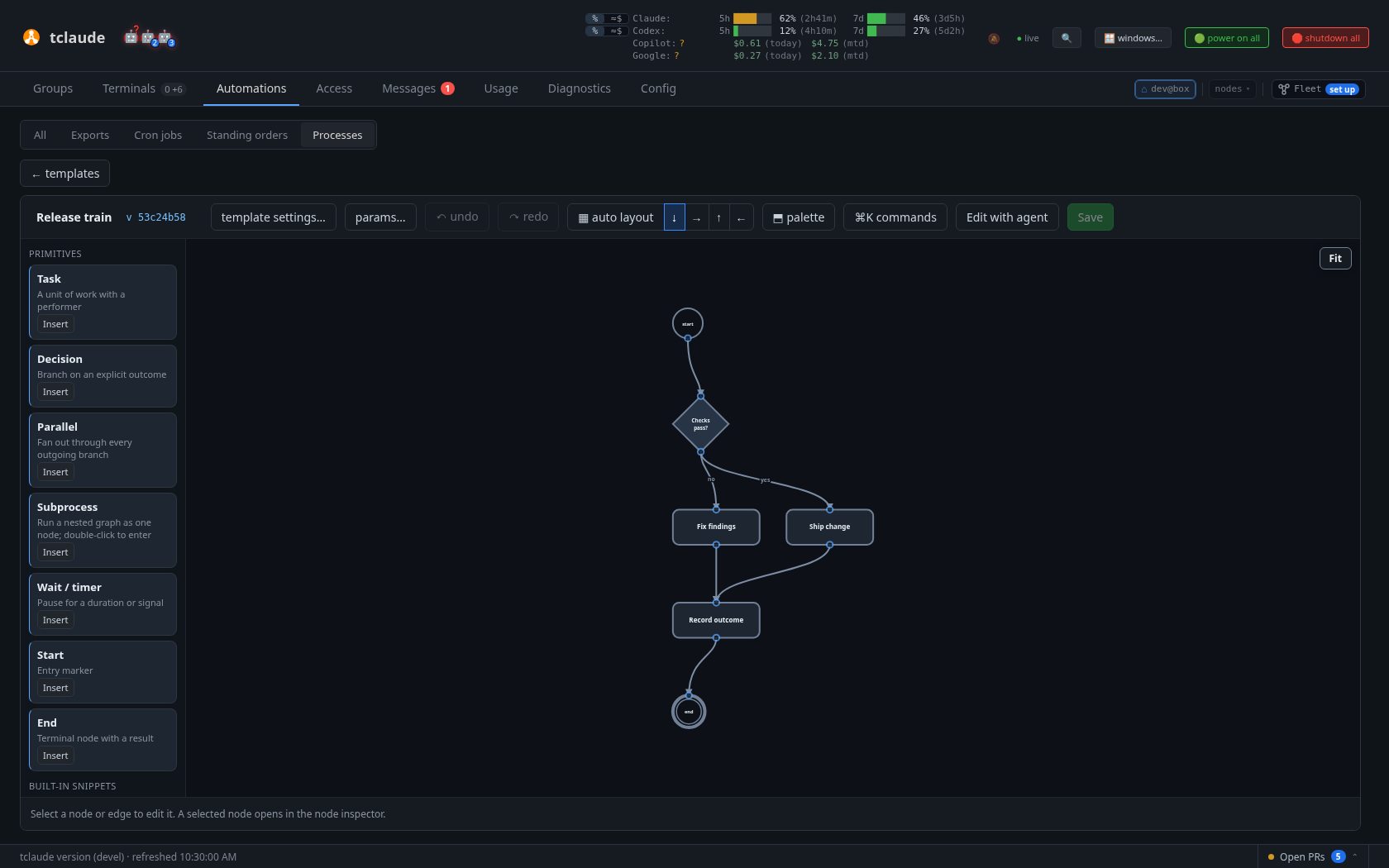
A process template in the dashboard editor: a decision branching to two tasks that join before the outcome is recorded
tclaude process run <template-id> --param key=value \
    --authorize-program-profile <profile>
tclaude process runs ls
tclaude process show <run-id>
tclaude process events <run-id>
tclaude process pause <run-id>
tclaude process resume <run-id>
tclaude process decide <run-id> --node <node> --verdict <verdict> [--attempt N]
tclaude process reconcile <run-id>
tclaude process reissue <run-id> [--node <node>]
tclaude process record-outcome <run-id> [--node <node>] \
    --outcome succeeded|failed
tclaude process resolve-blocked <run-id> --node <node> --attempt <n> \
    --action retry|skip|cancel [--note "why"]
tclaude process block <run-id> --node <node> --reason "why" [--attempt <n>]
tclaude process cancel <run-id> [--note "why"]
tclaude process send-back <run-id> --node <step> [--note "why"]
tclaude process amend <run-id> --print > run.yaml   # then edit it
tclaude process amend <run-id> --file run.yaml [--note "why"]
tclaude process amend <run-id> --list
tclaude process amend <run-id> --save-back <n>   # templates.manage
tclaude process report succeeded|failed [--run <run-id> --node <node> \
    --attempt <n>] [--verdict <verdict>] [--note "summary"]   # agent performers only
tclaude agent process-templates ls
Creating a run pins the exact saved template head and its parameters; later
edits to the template never change a run already in flight (amending a
run, below, changes only that run's own copy). Every program
profile a run may execute must be authorized explicitly at creation with
--authorize-program-profile — nothing is authorized implicitly, and that
includes every derived stage of a compound task, not just the parent's
performer.
Permissions: reads (runs ls, show, events) require process.runs.read;
every mutating verb requires process.runs.manage. Neither is an ordinary
default, but owning a group confers process.runs.read, so a coordinating
agent can watch run status and evidence without a human approval per read.
Ownership confers reads only — mutations always need an explicit
process.runs.manage grant or a one-shot --ask-human approval — and an
explicit per-agent deny overrides everything, the owner grant included. See
Permissions and audit. Starting a run bound to a
group or an agent uses the scope gates below instead.
A run scoped to a group is that group's resource too: its members read it
without process.runs.read. They list the group's runs with
runs ls --group <g>, and show and events them (groups.resources.read,
conferred by membership). The boundary is deliberate: membership confers no
mutation. Pausing, resuming, deciding, assigning, reissuing, resolving a
block or recording an outcome steers other agents' work, so they stay on
process.runs.manage. An unfiltered runs ls still needs
process.runs.read.
A run for a board task
A run can be for a task on a group's board: tclaude process run <template>
--task tk_…, the task's ⋯ Run with a process… in the dashboard, or
tclaude agent taskboard add <group> "title" --process <template>, which
adds the task and starts the run in one step. The run is the task's group's
(scoping it to one member with --agent also works), and it gets the task as
inputs: its title and brief as {{params.task}} and its id as
{{params.task_ref}}. A start that passes either param keeps its own value.
A task has one live run at a time; a second start for it is refused with the
live run's id. runs ls --task tk_… lists a task's runs. The task card shows
the run's progress (the step it is on, the round of a loop, who it waits on,
a bar of its steps), and the run's card in Resources says which task it is
for and links back to it.
The run's end settles the task. A completed run closes it as done, a failed one blocks it with the reason ("its process review failed (run …)"), and a canceled one leaves it as it is: someone stopped the process, not the work. A task closed by hand meanwhile is left alone.
A board can have a default way of working: tclaude agent taskboard
options set <group> process=<template>, or the ⚙ Board options drawer's
Way of working tab, offered once the group has a saved process. It is
unset by default. With one set, a new task shows ◈ will follow X when
started and the run starts when the task is taken or started, unless the
task chose another (taskboard edit tk_… --process <template>) or none
(--process none). A task's process runs once, from its start: a task that
already had a run starts no other on its own. The board's way of working
runs as the operator's, so a member that takes the task needs no
process.runs.start. Setting the board's way of working, or choosing a
process for one task, does need it, and the template must exist. Starting a
run for a task also needs taskboard.write on the task's board, whatever the
run's scope, and a run bound to one agent must be bound to a member of the
task's group.
Oversight and escalation
A process cannot encode every corner case, so every run has an overseer: the agent (or the operator) that answers when the run gets stuck or someone in it raises a concern.
- The overseer is the one set with
tclaude process run --overseer <agent>or later withtclaude process oversee <run-id> <agent|operator|default>(process.runs.manage; an agent starting a run may name only itself without it). With none set, the template'soverseer:decides (lead,starter,operatororrole:<role>), and without that it is the group's lead (a member with the rolelead, else an owner), else whoever started the run. A template that namesrole:<role>orstarterhands that member the overseer's steering below, so who holds a role is part of the template's trust. - Overseeing a run grants, for that run only, what steering it needs: pause, resume, reassigning a step, parking a step, and answering its concerns. It does not grant editing the template, handing the run to another overseer, or cancelling the run.
- Parking a step (
tclaude process block <run-id> --node <node> --reason
  "why"
, or ⏹ Park on the run view with the step selected) stops an agent step that is out: its performer is told to stop, a late report of that attempt is refused, and the step waits as blocked onresolve-blockedretry, skip or cancel, like a step whose retries ran out. The reason is what the operator decides from: the run view (desktop and phone) shows each blocked step and its reason under the run's header, with ↻ Retry and ⤼ Skip this step; ✕ Cancel run… beside them gives the run up. A park's reason is often a question: the note beside Retry (resolve-blocked --action retry --note "…") is its answer, handed to the step's performer with the retried attempt. - Sending the run back (
tclaude process send-back <run-id> --node
  <step>
, ↶ Send back on the run view with a finished step selected, or the operator's card when a concern names a finished step) runs a finished step of the run's own graph again. Everything downstream of it goes back to pending as if it had never run: agent work still out there is withdrawn, decisions and agreement votes are asked again, loops wholly downstream count their rounds afresh, and outputs reported there no longer feed later prompts ({{ outputs.x }}reads "none reported yet" until the step reports again). Attempt numbers never go backwards. A program still running downstream refuses it; a branch running alongside that already reached a node downstream refuses it too. Inside a loop, go back to the step the loop starts at, not to the middle of its body. Every decision and vote it reopens gets a new window, so a verdict given before is refused. It needsprocess.runs.manage. - Amending the run (
tclaude process amend <run-id> --file, or ✎ Amend run on the run view, which opens the run's own copy in the graph editor with the steps it has reached locked and marked 🔒, and offers YAML as a fallback) changes the run's own copy of its template, never the template itself until it is saved back. It changes only the part the run has not reached: steps that have not started can be added, removed, changed and rerouted, and a step being worked on can still be rerouted (to insert a step after it). A started step is otherwise left as it is; send the run back to before it, or park it, first. An amendment cannot add or change a program step or a subprocess, since programs run under the profiles the run was started with. Withprocess.runs.manageorprocess.templates.manageit applies at once. The run's overseer proposes one, and the operator applies or rejects it from a card that lists the steps it adds, removes, changes and reroutes. A proposal is checked against the run as it was when it was proposed: if the run has moved on since, applying it is refused ("the run moved on") and it has to be proposed again. The run view lists every amendment with what it changed, who made it and when, and the run log records it. Saving back (⤴ Save back to template on the run's latest applied amendment, ortclaude process amend <run-id> --save-back <n>, withprocess.templates.manage) makes the amended copy the template's next version, so runs started from then on follow it. It is refused if the template was edited since the run started, so those edits are not lost; carry the amendment over in the editor by hand instead. - Cancelling the run (
tclaude process cancel <run-id>, ✕ Cancel run on the run view, or the operator's card) gives it up from any state: nothing more starts, work still out is withdrawn, and it endscanceled. It needsprocess.runs.manage; an overseer without it raises a concern, and the operator's card always offers the cancel.
Anyone taking part in a run (its overseer, its group's members, its performers, whoever started it, the operator) can raise a concern:
A concern climbs the escalation chain until someone settles it:
- The overseer answers with
tclaude process answer-concern <run-id> <n> continue|pause|escalate --note "why".continuesettles it and lets the run go on, resuming it if paused.pausesettles it by holding the run.escalatepasses it up. - The group's escalation agent, if the group has one: a member with the
role
escalationthat holdsprocess.runs.manage. It answers the same way. - The operator gets a decision card in Messages, on the run in Groups ›
Processes, and on the run's phone page. The card names who raised it, why,
and how it got there. Its choices depend on what the run allows: Resume,
Skip this step (when the step is blocked), Reassign (when the step
has an agent attempt), Keep paused, and Cancel the run (when a
branch is blocked). The daemon applies the pick, records it in the run log
and mails it to the overseer. For Reassign, the overseer then hands the
step on with
tclaude process assign.
A holder that does not answer within 30 minutes is passed over: the run
pauses and the concern goes to the next level. A run only pauses when its
overseer pauses it, or when a holder does not answer. A concern raised by
someone who would hold it starts one level up, so an overseer raising one is
escalating it. An agent whose concern would go straight to the operator needs
human.notify (or process.runs.manage), as reaching the operator always
does. When a run ends, its open concerns are settled as run_ended and their
cards taken down.
The engine raises concerns of its own when a step stays stuck longer
than its patience: a template's patience: (a duration such as 45m),
overridden by a step's own patience:, and 30 minutes when neither says.
| Signal | When |
|---|---|
blocked |
The step's branch is blocked: its retries are spent. |
no_performer |
Nobody can take the step. |
no_report |
The step was handed out and not reported. Only raised for a step (or template) with a patience of its own: agent work has no natural length. |
An engine concern goes to the overseer like any other and climbs the same
chain. It is raised once per stuck spell: answering it ("carry on") does not
bring it back while the step stays as it was. When the step moves on, the
concern settles itself as cleared, as does one whose step became stuck
again in a new way (a retry handed out anew). A paused run raises nothing
new, and engine concerns never take more than half of a run's open concerns.
Every step is in the run's events and its log in the dashboard:
concern_raised, concern_escalated (with why it moved), concern_resolved
(with the pick and note), overseer_set, run_paused and run_resumed,
each with its actor. tclaude process show prints the overseer and the open
concerns. tclaude process concerns <run-id> --all lists settled ones too.
In the dashboard the run focus (Groups › Processes › a run) has an oversight strip under its header. It shows who oversees the run, its open concerns with their answers, and ⚑ Raise a concern. The side pane switches between the selected step and the whole Run log. A run card wears ⚑ while a concern is open, and a concern waiting on the operator puts the run in "needs you".
Run scope
Every run is bound to a context when it starts, and keeps that binding:
| Scope | Start with | Bound to |
|---|---|---|
none |
tclaude process run <template> |
nothing — the original, unscoped run |
group (⌂) |
... --group <name-or-id> |
the group's id, so renaming the group keeps the binding |
agent (◉) |
... --agent <agent> |
the agent's stable agent_id, so the run survives reincarnate and compact; a clone does not copy it |
The run's owner is whoever started it (human:operator or
agent:<agent_id>, or peer:<instance> for a linked node; see
federation peers). A linked node's run tasks only the
members in its scope, spawns no performer and runs no program. tclaude process show prints the scope and owner;
tclaude process runs ls adds a SCOPE column and filters with --group,
--agent and --performer. --performer matches runs bound to that agent
and runs with a node attempt dispatched to it.
Who may start a scoped run.
none:process.runs.managefor the template, as before.group:process.runs.startcovering the group. Group owners hold it for their own groups; anyone else needs a grant (unscoped, or scoped to the group and/or template). The human may always start one.agent: the agent itself withself.process(default-granted bytclaude setup --install-default-agent-permissions); for another agent,agent.process, orgroups.members.processcovering every group the target is in (group owners hold that for their members).
The scope gates confer the binding only. A run that authorizes program
profiles (--authorize-program-profile) also needs process.runs.manage,
and group ownership never satisfies that: scope narrows authority, it never
widens it into host program execution.
Where program steps run. Scope also narrows where a program step
(performer.kind: program) executes. The bounds are resolved when each
attempt is planned (a reissue resolves them again) and recorded on it:
| Scope | Working directory | Confinement |
|---|---|---|
none |
the daemon's, unchanged | none, unchanged |
agent |
the bound agent's current working directory (its worktree) | the sandbox the agent's current generation was launched with — its recorded sandbox profiles, enforced by tclaude's own layer (bubblewrap on Linux, Seatbelt on macOS) whichever layer confines the agent itself |
group |
the group's default working directory | the group's sandbox profiles, enforced by tclaude's own layer, as the group's default spawn profile would launch an agent |
- An agent with no OS sandbox at all (
--sandbox-impl offorresource-only, Codex--sandbox danger-full-access, or a harness sandbox recorded as off) has nothing to narrow to: its program steps run unconfined in its working directory. Likewise a group with no default spawn profile, or whose default profile runs unconfined, keeps the unscoped behaviour. Either way the attempt is recorded asunconfined, with the reason. - Bounds that cannot be enforced fail the attempt closed: the program
never starts, and never unconfined instead. That covers a host where
tclaude's sandbox is unavailable (no bubblewrap, no unprivileged user
namespaces), an agent whose sandbox snapshot is not recorded, and a group
with a sandboxing default profile but no default working directory. The
attempt's
program_observederror names what is missing; with a retry policy the branch parks as blocked like any other failure. - A program step runs under the neutral
shelllaunch identity inside the sandbox: it gets the profile's grants and its working directory, never a coding harness's credentials or state directories. Writes to a linked git worktree's shared.gitdirectory are not granted, so a program that commits needs a profile that grants them. - Resource limits in the profile are not applied to program steps yet.
Each attempt's program_prepared (or program_reissued) event carries a
bounds object — scope, cwd, sandbox (tclaude-layer or
unconfined), profiles, reason, and error when it cannot be
enforced. process show --json lists each program node's latest bounds
under programBounds, and the dashboard shows them on the program step (see
below).
Orphaned runs. A scope is never changed silently. If a group-scoped
run's group is deleted, or an agent-scoped run's agent is retired or
deleted, the run pauses with scope state orphaned (its action reads
orphaned and a run_orphaned event records why). Program work already in
flight finishes, but nothing new is planned and resume, decisions and
reconciliation are refused until the human re-scopes it:
tclaude process rescope <run-id> --none            # unbind it
tclaude process rescope <run-id> --group <group>   # re-bind to a group
tclaude process rescope <run-id> --agent <agent>   # re-bind to an agent
The one input an orphaned run still accepts is giving it up:
tclaude process cancel <run-id>, or resolve-blocked ... --action cancel
on a blocked node.
Runs of a deleted group stay listable with runs ls --group <group-id>.
rescope is human-only and records a run_rescoped event. On a bound
agent-scoped run, rescope --group promotes it to a group the agent
belongs to; completed history is kept. Demoting a group-scoped run to agent
scope is not supported.
Unscoped runs need no migration and appear only in tclaude process runs ls,
not in the dashboard: Automations › Processes lists templates, and the Groups
and Terminals overlays show scoped runs only.
Runs in context. The dashboard overlays poll GET /v1/process/context
alongside the snapshot. It returns one mini-graph projection per scoped run
(authored nodes with kind, state, work-step index and performer; edges with
their disposition; the current nodes) in a runs map, and refers to them by
id: per group active, needsYou (awaiting a decision, blocked, needing
reconciliation) and the recently finished done; per agent its current step
(index of total) in each run bound to it; and a top-level orphaned
list. It is bounded: each group or agent contributes at most 16 active and 8
finished runs (8 listed per bucket), at most 64 runs in all, and 48 nodes
per run. The human and holders of process.runs.read see every
scoped run; another agent sees its own groups' runs and the runs bound to
itself. Visibility is unchanged:
process.runs.read (which group owners hold) still gates the run surfaces.
In the dashboard
The dashboard covers the whole loop: authoring, starting a run in a group or for one agent, following it, and acting on it. All of it goes through the same daemon routes and permissions as the CLI.
New process (Groups). The group's + menu › ◈ New process stores
an untitled draft pinned to the group at once and opens it in place in the graph editor, with its name field
focused: type the name and press Enter. There is no name dialog. The draft
saves itself as you edit (draft · autosaved to the group). A new draft left
with nothing but start and end is not kept: closing it with ✕, or leaving it
any other way (another page, another tab, closing the browser), deletes it.
Save keeps a named one, and so does handing it on (to the step list, the
full editor, a run, or an agent asked to help or a scribe drafting it). Only a
draft made with New process in that editor is ever dropped, never one opened
from elsewhere or one that has run, and only if nobody saved to it since: steps
an agent added are never deleted with it. A name another process of the
group already has gets a warning beside the name field. Until the process
first runs, a step's id follows its name: renaming New step to Build it
makes its id build-it (made unique), which is what tclaude process decide
--node, the run views and agent messages show. Once it has run, ids stay
put. ◈ Graph and ☰ Steps show the same draft from the
start. The empty canvas reads start → + Add first step → end, and Start
from under it fills it: a built-in way of working
(which also names an untitled draft), ✨ Describe it, ↥ Import .pwf, or
More ways of working › (a library template). The inline inspector keeps to
the essentials (what, who, if nobody takes it, if it fails, then). If it
fails, on agent and command steps, is fail the run (the default), hold it
for me (the step waits, blocked, for you to retry, skip or cancel it),
retry N×, then hold it for me, or go on as failed, for a rule to see.
Holding and retrying save as the step's retry.maxAttempts (1, or N+1),
and a step that retries shows ↻N on the graph. Going on saves as mayFail
(not offered on a step with plan, check or review stages): to send a
failure somewhere, pick it and put a rule decision after it (see
Rule decisions). A decision's Who can be a rule:
its cases are rows, each made of what it reads (an earlier step's result or
exit code, an output, a param), a comparison and a value. + and adds a
condition to a case, + another case adds a case, and else names the
outcome when no case holds. The whole rule shows in plain words underneath
("Build succeeded → approve · otherwise → escalate"). A condition with or
or not shows as written and is edited in the full editor. In a run, the
decision is marked with what it chose (⚙ merge), and its inspector and the
run log say why in plain words, with the values the rule read. ⤢ Full editor opens
the same draft over the page, still pinned, with ← Back inline and ▶ Run…
in its bar. Save closes the inline editor and ▶ Run… opens the start form
on the draft. The other ways to make one (+ new template under Automations
› Processes, the dock's +, + New ▾ › New process and the palette's
Make a process in …) take the same path: in a group they open it there, and
otherwise they store an untitled library template and open it in the editor.
Building it with an agent. ✨ With an agent ▾ in the inline editor's
header brings an agent onto the open draft: Ask the steward, first when
your Steward is on this node, briefs it the way Ask an existing agent… does,
and brings it back first if it is not running (it reads the brief as it
starts); New helper starts the
template's process scribe (the same one the full editor's Get help
reaches), and Ask an existing agent… briefs one already running, such as
an agent you chat with, after you confirm any grant it lacks. The full
editor's Get help has Ask the steward too.
Either opens in its chat window, and a 💬 chip in the header brings that
window back. The agent edits through tclaude agent process-templates, and
the open editor follows: each version it saves is merged onto your canvas as
one change, with a line saying who changed what and undo to take it back
out. Your own unsaved edits stay. When you both changed the same step, you
choose Use theirs or Keep mine; their other changes merge either way.
With ✨ Describe it, describe the flow in plain words and press Draft
steps: a process scribe drafts the steps in the background for the group's
members and roles.
This uses a model run, so it only ever starts from that click, after you
approve the scribe's access: the same grant as any process scribe
(process.templates.read and process.templates.manage, every other
permission denied; see Co-design with a scribe below). The grant is not
limited to this draft: the scribe is asked to work on it, and it can save any
process template. The draft is saved to the group (pinned, not listed in the library),
and the scribe opens in its regular overlay chat window (a terminal tab
without the companion), with your words as the first message: answer it or
ask for changes there. The group body says whether it is working or waiting
for you, and 💬 chat window brings the window back. When it has saved a
draft and is idle, Review steps opens the draft in the step list. Stop
scribe stops it, keeps the draft and opens what it saved so far, and open in
graph editor opens the draft in the graph editor, where Get help reaches
the scribe. A reload or a tab
change brings the panel back while the scribe is running; hide leaves the
scribe working, and ✎ Scribe in the process's ▶ strip reopens the panel. The
scribe cannot start a run, and nothing runs until you press Start now. Start
now runs the version on screen: if a newer one was saved after you opened it,
say by asking the scribe for more through the graph editor's Get help, nothing
starts, and you choose between reviewing the newer version and starting the one
you reviewed. Start in a process's ▶ strip, like the group's start form, runs the current
version, and asks first only while a scribe is at work on it: when its scribe is mid-turn, or when
a running scribe saved a version you have not opened from the group. Reviewing
in the graph editor does not count, so that version can ask once. You then open
the draft or start anyway, and if the version changes before you answer, nothing
runs. An idle scribe with nothing new adds no step, so reruns stay one click. The
step
list edits a process as numbered steps, each done by a specific agent, any
member with a role, anyone free in the group, a new agent, you, or a command.
A new agent… spawns a fresh agent for every run of the step in a group, with
the spawn profile you pick beside it (or the group's default); a run bound to
one agent gives the step to that agent; the graph shows it as
a new agent · <profile>. One line sets
what an agent step does when no member can take it (wait, spawn a new agent
with the group's default spawn profile or another profile you pick beside it,
or fail: the template's
fallback), and an agent step can override that with its own choice under
its Who picker, or follow the process; a step that does not simply wait shows
its fallback (↯ spawn opus-lead, ↯ fail) on its node; your answers to a you step branch to
later steps, and {{name}} in a prompt becomes a start input. A preview, the
start inputs and who each step would use now (the daemon's resolve-preview,
a dry run of the group rules) update as you edit. A command
step runs on this host only after you tick Allow step N to run for its
program profile. Start now
runs the steps once in the group (saved as an unlisted template, so a one-off
run leaves nothing behind in the library or the group); Save to
Tracks in the small graph. ⫴ alongside on a step that is already a track of a fork adds another track to that fork, joined where the others join, instead of opening a second fork. + after on a step also offers ↺ reviewer track: a review an agent decides (approved, or changes) and a fix it sends the work back to, which returns to the review (see Tracks). The fix goes to the agent that did the reviewed step (same agent as), so fixes from every track queue on that one agent while the reviews run alongside each other; it is a step like any other, and its inspector changes who does it. A second ↺ reviewer track on the same step, or ⫴ alongside on a review, puts the reviews alongside each other, joined before what came next. When a track's rounds run out it fails the run by default; When rounds run out also offers ask me, a decision of yours to count the track as approved or fail the run. A run's graph shows each track's round (↺ 2/3) on its active step, and a join that some tracks have reached says which it still waits for (⧗ waiting for Review 2).
Authoring (Automations › Processes, then open a template). The graph editor has the node inspector, live validation, undo/redo, snippets and versioned saves; see Dashboard › Processes. Its node inspector shares the inline editor's rule rows and If it fails row: a decision's Performer kind can be rule, whose cases show both as rows and as text (the text is how a condition with or, not or parentheses is written), and a task's If it fails · patience block can make it go on as failed. A task added on the canvas comes with an agent doing it. Three things there are specific to processes:
- Co-design with a scribe. The editor header's Get help ▾ brings an agent in: New helper starts the template's scribe (or reopens the one already scoped to it) after you confirm its grant, and Ask an existing agent… briefs one already running, granting only the process-template permissions it lacks, again after you confirm. Either opens in its regular overlay chat window (a terminal tab without the companion). The menu's context actions send that agent the selection, a node to explain, the focused validation issue, or a description to draft from, as a message you preview first; with no helper running yet, they start one with that ask. When the scribe saves a version, Review on canvas paints it over your draft (added, changed, removed) and you accept or reject each change; your own unsaved edits are never overwritten, and conflicting edits are flagged rather than merged silently. The scribe can save an unfinished template too: graph and semantic validation errors are advisory on save (the draft just cannot run yet), so each step it makes reaches your canvas as it goes.
- The editor's menus. The header carries the drawing board's menu bar: File has Save, Export › Workflow file (.pwf)…, Template settings… and Params…; Edit has Undo, Redo and Auto layout (tidy the graph, and the flow's direction); View has the node palette, Commands… and the moves below. Get help ▾ and Save stay beside the menus.
- In an overlay window or a window of its own. View › Open in overlay and Open in separate window move the editor over the dashboard or into a browser window of its own, so you can edit beside a chat or a drawing board. It moves as it is: unsaved edits, undo and redo, and the version a save is checked against go with it, and nothing is saved on the way. An overlay tab reorders, groups and joins other windows like any overlay tab, and its title bar and right-click menu have Open in the Processes tab and Open in separate window. A separate window has Open in the Processes tab and Open in overlay while the dashboard that opened it is still open, and asks before closing with unsaved edits. If it closes before it has the draft, the editor comes back to the dashboard. A template is edited in one place at a time: opening it from the list while it is elsewhere brings that window forward. Ctrl S (⌘ S on a Mac) saves a floating editor while its window has the keyboard, and ⌘K serves the editor you last clicked in. Closing a floating editor, from the dock or with its window's close button, asks first when it has unsaved edits. A reload reopens an overlay tab on the last saved version.
- In a Collab tab. + New ▾ › Process… in the Collab side panel
lists every template, under the
groups it is pinned to (Not pinned last), with a box that searches names,
ids, descriptions and groups. Pick one to open its editor as a Collab tab, or
type a new name and + New process stores a blank template and opens it.
+ New ▾ › New process skips the list and opens an untitled one.
/collab/processes/<id>opens that template's tab, and/collab/processesopens the list. A process tab reorders, joins tab groups and drags off the strip like a drawing board tab, and its View menu and right-click menu have Open in overlay, Open in the Processes tab and Open in separate window; an overlay tab has Open in the Collab tab. The editor moves as it does between the other places, draft and all, and an editor open in the Processes tab moves to the strip when you pick it from Process…. Closing a process tab asks first when it has unsaved edits. Back to the Processes tab's URL of a template in a Collab tab brings the editor back there. - Subprocesses. A ▣ node runs a nested graph (see Subprocess nodes). Double-click it to edit its body in place: a breadcrumb and a minimap of the parent show where you are, the dashed port nodes are its contract (⇄ ports binds body params and maps body ends onto the ▣ node's outcomes), and Esc or Alt ↑ goes back up. The palette's outline lists every nested body. ⇪ extract as template saves a body as its own template and turns the node into a reference to it. A reference is not edited in place, since other templates may share it. While you author, the editor resolves each reference the way a run would, and any problem (a missing template, in-ports it does not declare or leaves unbound, trouble further down) marks the ▣ node. Its inspector lists them as "inside template X: …" with an open X to fix button.
- Composing on the canvas. The palette also lists your other templates: drop one (or any node kind) on the canvas, or onto a connector to splice it in between. ⊞ expand draws a ▣ node's body on the parent canvas as a framed group whose nodes you edit in context; ⊟ collapse folds it back. Select a region and choose ▣ wrap as subprocess… to fold it into one ▣ node — the ports come from the connectors crossing its boundary — and ⇲ unwrap inlines a body again.
Starting a run. In Groups, in the Both or Processes focus, open
the + menu on the group and pick ▶ Run a process…, and choose the group
or one agent (for a run bound to that agent): pick a template, fill its params, and tick the
program profiles you authorize it to run under (never pre-ticked). A group process
is group-scoped (⌂) and an agent process is agent-scoped (◉). The CLI equivalent
for an agent is --agent.
Following it.
- Groups, a group's Agents section — each group header counts running, waiting-on-you and planned runs, and the optional Process column (turn it on under ▾ view) shows a run › node badge on each member row for every run the agent works in (amber when parked on a human gate, dashed when queued).
- Groups, a group's Processes section — each group's runs as live graph cards with the agents on the nodes they perform, needs-you first. open › focuses one run: the live graph, a docked inspector (approve or request changes on a human gate, the node's history), the group's agents as a performer dock, and the run's ⏸ pause / ▶ resume.
- Terminals — a pane whose agent takes part in a run shows a small top-right cluster of run icons (ring = run state, badge = this agent's step i/n), repeated on the tab. An icon opens a popover with the mini-graph and the agent's node lit, its contract, what feeds it and what waits on it, and the run actions. A run bound to that agent opens instead as a vertical stepper with a bounds strip (working dir, sandbox, grants, spend, identity). Each program step says where its attempt runs or ran (directory and sandbox), and a step recorded as unconfined, or whose bounds cannot be enforced, is flagged. The run focus inspector shows the same on a program node as runs.
Acting on it. Decide human gates from the run focus or the popover; reassign an agent node by dragging a member from the performer dock onto it (or reassign node in the Terminals popover); pause and resume from the run focus, the popover, or the stepper. Each maps to the CLI verb of the same name and needs the same permission.
What executes today
- Sequential task chains starting at any executable node kind — top-level
startnames the entry node, and a separatestart-typed node is optional. - Exclusive decisions with human, agent or rule deciders: the verdict selects
exactly one authored outcome edge and closes the alternatives. Authored
decisions open once — unless they are in a loop body — and need no
--attempt. An agent decider reports its verdict instead of a person deciding (see Agent deciders). - Parallel fan-out (
type: parallel) reduced byjoin: allorjoin: any. Branches execute concurrently, bounded to four external programs at a time; ready branches past the bound wait for a slot. A branch parked on a human decision does not block its siblings. - A failed or canceled end ends the run early. A branch of a fork
(a track) may stop at an end whose
resultisfailedorcanceledinstead of reaching the join, for example a review that gives up. Reaching it ends the whole run without waiting for the other tracks. Nothing more is planned, decisions still open are dropped, agent work in other tracks is withdrawn, and the run finishes with that end's result once programs still running have reported. The join never runs. Several tracks may share one such end, and the first to reach it ends the run. An end that succeeds still has to come after the join. Inside a subprocess body this does not apply, since a body's ends complete its subprocess node instead. join: anyraces its branches. The first arrival wins and alone activates the reducer and everything downstream. Losing branches are not cancelled — they run to their own settled outcome and are recorded as evidence that cannot replace the winner or run the downstream route twice, and the run reports no terminal status until every dispatched branch has settled. A losing branch that fails still fails the run, exactly as underjoin: all. If the winner's route reaches a failed or canceled end, the run ends there and the losing branches' agent work is withdrawn (see above).- Program performers (
performer.kind: program): executed as argv without a shell, with a bounded environment and bounded output, inside the run scope's bounds (see Where program steps run). - Bounded program retries.
retry.maxAttempts: <n>includes the first attempt and is capped at 100; attempts run back to back, and nothing can interrupt a task still spending its budget. A failed attempt inside the budget re-readies only that node; parallel siblings are untouched. A task with noretrypolicy stays fail-fast. Every attempt carries its own attempt number and command id, so a delayed report from an earlier attempt is refused as stale rather than credited to the current one. Attempt numbers are visible inshow --jsonand in theprogram_prepared/program_observedrows ofevents. - Blocked-branch parking. When a retry-authored task exhausts its budget,
the branch is parked, not failed: the node becomes
blocked, the run stays running, and siblings keep executing. (retry.maxAttempts: 1and no policy at all therefore behave differently on purpose.)showlists each parked branch with the exact blocked attempt and the failure reason; an operator resolves it withresolve-blocked.retryopens one more authored-size attempt window (attempt numbers keep counting up);skipsettles the task through its authored route as a success would, distinguished only by theblocked_resolvedevidence;cancelgives up on the whole run — parked branches and awaited decisions are dropped, already-dispatched programs drain honestly, and the run finishescanceled. The node and attempt must match exactly, so a stale or wrong-branch resolution is refused. A parked branch keeps the run open: an end node will not complete around a resolution still on offer. - Compound tasks. A task declaring
plan,checks, orreviewruns its stages in order —<id>.plan,<id>.do,<id>.test.<step>,<id>.review, and the engine-owned<id>.done. Each stage is an ordinary node under its derived id: dispatched, observed, reconciled, and shown like a plain program task. Stages are derived from the pinned template on every load, never stored, so nothing can drift. The parent staysrunningwhile any stage is live and settles its single authored route exactly once, whendonecompletes; a failed stage fails the run like any fail-fast task. With aretryon the task, a failed check or review sends the work back instead: the do stage runs again under the task's budget, followed by every stage up to the one that failed. Stage performers are programs or agents — an agent stage is dispatched like an agent task, and itsfailedreport is a failed stage. A do stage an agent performs is told which stage sent its work back and what that stage reported. Stage-levelretry/approvalRetryare not executable yet. - Human plan approval. A compound whose
plandeclaresapproval: humangains one extra stage between plan and do,<id>.plan.approval: an awaited decision with the fixed verdictsapproveandrework, decided through the ordinarydecidecommand and permission.approvereadies the do stage;reworkreturns the plan stage to ready, and the window reopens when the re-run plan succeeds. There is no approval budget — each rework is one explicit, audited human action buying exactly one more plan execution. Because the window can reopen, a verdict must name it:
show reports the exact --attempt in its next-step hint, and the run
refuses any other value — including a verdict formed against an earlier
window and submitted late.
- Subprocess nodes (
type: subprocess) run a nested graph as one node of their parent. The body is either inline (subprocess.start,subprocess.nodes,subprocess.params) or another stored template (subprocess.templateRef, optionally pinned withversion: sha256:<hex>). The body is its own param scope:subprocess.inputsbinds each body param from a literal or{{ params.x }}of the parent, and an unbound param falls back to its default.subprocess.outputsmaps each body end node to one of the subprocess node'snextoutcomes; with a single outcome, unmapped ends use it. Body nodes run under namespaced ids (<id>/<inner id>), so a body decision is decided withdecide --node review/gate. The subprocess node staysrunningwhile its body is live and settles its own route exactly once, when a body end node is reached; on an untaken branch the whole body is skipped with it. Referenced templates are resolved when the run is created and embedded in the run's snapshot, so later edits to them never change a run in flight; reference cycles and nesting deeper than four levels are refused. Inner program profiles need authorizing at run creation like any other. - Agent performers (
performer.kind: agenton a plain task) — see Agent performers below. - Bounded review loops (see Review loops). The decider's
evidence note is handed to the agent step the work goes back to, together
with the round (
Round: 2 of at most 3), and that step goes back to the same performer when it can.show --jsonlists each loop with its round underloopsand putsround/roundson commands; the process context carriesround/roundson loop nodes andmaxIterationson the edge that goes back. Each round is recorded asloop_iteratedevidence, and a used-up loop asloop_exhausted. A decision in a loop body reopens every round, soshowreports itsattemptwindow from round two on;decidewithout--attempttakes the current window.
One sizing rule applies only to running: a run records durable evidence per node, and that row bounds node ids at 256 bytes. Run creation refuses a template whose node ids — authored, derived from compound stages, or namespaced into a subprocess body — exceed it; editing and storing such a template still works.
What does not execute yet
These CLI verbs are stubs that return a "process runtime is temporarily
unavailable: no engine is installed" error: preview, apply, worklist,
advance, unblock, observe, resolve, verify, repair.
These authoring features are valid in a stored template but refused at run
creation with a path-specific diagnostic, rather than failing later: human
task performers; agent performer timeout; retry backoff waits; same-session retry feedback
for program tasks (retry.onFail: feedback-same-session is executable only
for agent tasks); retries on compound stages; plan.approvalRetry; human
stage performers; poison handling; wait nodes; outputs (captures) on
anything but a plain agent task.
Agent performers
A plain task with performer.kind: agent is performed by an agent. When the
node becomes ready the daemon resolves a performer from the run's scope and
delivers the node's prompt as a message in that agent's inbox — never by
typing into its pane. The message carries the run id, node id, and attempt,
and the exact command to report back with:
tclaude process report succeeded --run <run-id> --node <node> --attempt <n> \
--note "PR #12 is open"
tclaude process report failed --run <run-id> --node <node> --attempt <n> \
--note "why it failed"
--run, --node, and --attempt may be omitted when the agent has exactly
one open node. The report is authenticated by the calling agent's identity and
must match the exact attempt that was delivered to it: another agent is
refused, a report for an older attempt is refused as stale, and a repeated
identical report is acknowledged without being applied twice. A report goes
through the same transition a program result does, so retry budgets, parking,
and fail-fast behave identically.
Who performs the node. An agent step names at most one selector:
assignee: a specific agent, by name or agent id;role: any member of the run's group with that role;anyone: true: anyone in the run's group;lead: true: the group's lead — a member with the rolelead, else a member that owns the group.
With none of them, the step's profile is the role (the original shape): a
member whose role matches the profile, or the role that spawn profile
declares. With no selector and no profile, no member matches, so the step's
spawn fallback runs straight away: {kind: agent, prompt: …, fallback: {action:
spawn, profile: P}} spawns a fresh agent with profile P for every group run
of the step (a run bound to one agent still gives it to that agent, and an
unscoped run waits). This is the editors' Who › a new agent….
What happens when nobody can take the step is its fallback, separate from
the role: fallback: {action: spawn, profile: P} spawns a fresh performer
into the group (with no profile, the group's default spawn profile), wait
waits as needs performer, and fail fails the attempt, so the step's
retry and fail routing apply. Set it on a step, or once for the whole process
with a top-level fallback; the step's own wins. A step with neither uses
the legacy spawn: allowed (spawn with its profile), and otherwise waits.
Validating a template warns (unknown_spawn_profile) about a fallback that
names a spawn profile this node does not have; such a spawn is refused.
A spawn fallback that a spawn profile refuses fails the attempt with the reason, instead of waiting for a performer that cannot come. The refusing profile can be the step's own, the group's default or the global default: it is disabled, or it is operator-only and an agent owns the run. The first such refusal for a run owner in a group is also sent to that owner and to the operator; a performer spawned there again re-arms the notice.
| Scope | Resolution |
|---|---|
| group | the explicit assignee, if it names a current member; else, with sameAs, that step's performer; else a member the selector admits (its role, anyone, the lead, or the profile role) and differentFrom does not rule out, idle first, then busy, then offline, and among equals the one holding the fewest open process steps; else the fallback — a spawn only when the run owner could spawn into the group |
| agent | the bound agent performs every agent node; an assignee naming anyone else waits as needs performer |
| none | only an explicit assignee (any active agent); otherwise the node waits as needs performer, or fails when its fallback is fail |
POST /v1/process/resolve-preview with a template and a group answers, for
each agent step, who would take it if the run started now — a member, a spawn
of which profile, a wait, or a failure — without starting anything. The
process context lists each group's defaultSpawnProfile and member roles.
Same agent, different agent. Two constraints sit on top of the selector, naming other agent steps of the same graph:
sameAs: <step>hands the step to the agent that performed that step (its latest attempt), for example a fix-up that goes back to the implementor. Before that step has run, or once its performer has left the group, the selector chooses.differentFrom: [<step>, ...]keeps the step from every agent that performed one of those steps, for an independent vet or a second reviewer. It holds both ways: two steps that must differ never share a performer, whichever is dispatched first, which is what keeps two reviewers running alongside each other apart. A compound step's stages count as the step.
A constraint wins over the selector's preference: sameAs takes that agent
even when it is busy, and differentFrom leaves the excluded agents out even
when no one else matches, in which case the fallback applies (a spawned
performer is always a different agent). An assignee names one agent, so it
takes no constraint. An agent-scoped run is performed by its bound agent
throughout, constraints or not.
nodes:
implement:
type: task
performer: {kind: agent, role: dev, prompt: "Build it.", fallback: {action: spawn}}
vet:
type: task
performer: {kind: agent, role: ux, differentFrom: [plan, implement], prompt: "Vet it."}
merge:
type: task
performer: {kind: agent, lead: true, prompt: "Final check, then merge."}
Parameter types. A param's type is string (also when left out),
number, integer, boolean, object or array, and its default, when
it has one, must be a value of that type (default: false for a boolean,
not "false"). Validation refuses any other type or a mismatched default.
Step outputs. A plain agent task can declare outputs with
captures: [<name>, ...]. Its performer reports a value for each with
--output <name>=<value>; a step with a single output can leave that out,
and its note is the output. A later step's prompt (or a person's ask) reads
the value as {{ outputs.<name> }}, filled in when the step is handed to its
performer, so a loop's next round reads the latest value. Parameters keep
their own form, {{ params.<name> }} (the editors' bare {{name}} is short
for a parameter, never an output). The value is marked in the prompt as
reported by an earlier step, so the agent reads it as data, not as the
template's instructions.
nodes:
plan:
type: task
captures: [plan]
performer: {kind: agent, role: planner, prompt: "Plan {{ params.task }}."}
build:
type: task
captures: [pr]
performer: {kind: agent, role: dev, prompt: "Build this plan:\n{{ outputs.plan }}\nReport the PR link as pr."}
review:
type: task
performer: {kind: agent, role: reviewer, prompt: "Review {{ outputs.pr }} against the plan:\n{{ outputs.plan }}"}
A success that leaves out a declared output is refused at that step, with
the command that would fix it, and the agent reports again; nothing later
ever reads a blank. A name the step does not declare is refused too. An
output is declared by one step only; a {{ outputs.name }} that names no declared
output is a validation warning and stays as written. Each value is at most
16 KiB. show --json lists what each attempt reported under performers[].outputs.
A needs performer node is retried on every runtime sweep (once a minute),
so it is picked up as soon as a matching member joins. show prints the
reason it waits.
Retries. retry.onFail: fresh-attempt (the default) hands the next
attempt to a different performer when one is available — spawning one if the
step's fallback says so — and only falls back to the previous performer as a last
resort. retry.onFail: feedback-same-session hands it back to the same
performer, together with the note its failed report carried.
Performers going away. An offline performer keeps the node: its inbox holds the prompt and the node simply waits. A performer that is retired or leaves the group is replaced by re-resolving the same attempt. A run bound to an agent is never re-resolved to someone else.
People always win. record-outcome --node <node> settles an agent's node
in its place; the performer is told the attempt no longer needs it, and its
later report is refused as stale. When a run is ending — a sibling failed, or
an operator cancelled — outstanding agent attempts are withdrawn and their
performers told to stop.
Reassigning. tclaude process assign <run-id> --node <node> --agent <agent>
(HTTP POST /v1/process/runs/{id}/nodes/{node}/assign with {"agent": ...})
hands a node's outstanding, not yet reported attempt to a named performer. It
needs the same permission as decide. The new performer must fit the run's
scope: a member of a group run, the bound agent of an agent run, or for an
unscoped run an agent the owner (and an agent caller) shares a group with. It
gets the prompt and is the only agent that may report; a previous performer is
told to stop. A node that is not ready yet, already reported, or not agentic
has nothing to reassign (409).
In the dashboard the same operation is a drag: in Groups › Processes, drag an agent from a run's performer dock onto its agent node (or use the node inspector's reassign picker); in Terminals, the run popover's "reassign node" opens a picker of the group's members.
Pausing. tclaude process pause <run-id> (HTTP
POST /v1/process/runs/{id}/pause) holds a run: it dispatches no new agent
turns or program commands, while attempts already in flight finish and their
outcomes and reports are recorded. Decisions are still accepted; what they
make ready waits too. A paused run's paused field says who paused it and
when, its action reads paused unless something still needs a human, an
undelivered agent attempt stays undelivered, and reassigning (which would
start a new turn) is refused until it is resumed.
tclaude process resume <run-id> (POST /v1/process/runs/{id}/resume)
releases the pause and plans what waited. Both need the same permission as
decide, are idempotent, and record run_paused / run_resumed evidence; a
finished run cannot be paused. The dashboard's Pause / Resume control sits in
the Terminals run popover and stepper and in the Groups single-run focus.
show --json lists every attempt's performer under performers (agent,
display name, live status, how it was chosen, and what it reported); outstanding
agent commands report their dispatch state (pending, needs_performer,
delivered, reported) instead of needs_reconcile. A daemon restart picks
in-flight dispatches back up without re-sending them. An outstanding agent
command occupies one of the run's four concurrency slots, like a program.
Agent deciders
A decision with performer.kind: agent is decided by an agent. It is
dispatched exactly like an agent task — same selectors, fallbacks, and inbox
message — and nobody is asked for a verdict. The message lists the verdicts
the agent chooses between, and the agent reports one:
tclaude process report succeeded --run <run-id> --node <node> --attempt <n> \
--verdict changes --note "add tests for the empty-input case"
The verdict routes exactly as a person's would, loops included, and the note
is the decision's evidence: when the verdict sends work back for another
round, that round's performers are told it. A verdict that is not one of the
decision's outcomes, or that would go back past a loop's last round with no
onExhausted, is refused and nothing is recorded, so the agent can report
again. An agent that cannot decide reports failed, which fails the decision
like any failed agent step. Nobody can decide in an agent's place with
tclaude process decide; reassigning or recording an outcome works as for any
agent step.
Rule decisions
A decision with performer.kind: rule decides itself. It has cases, each a
condition and the outcome it picks, and an else. As soon as the decision is
ready the engine takes the outcome of the first case whose condition holds,
or the else outcome when none does. No agent or person is involved. Use it
for the branches a process must take the same way every time: "merge only if
merging is enabled and CI passed".
params:
merge: {type: string, default: "no"}
nodes:
ci:
type: task
mayFail: true
performer: {kind: program, run: make test}
next: {next: gate}
gate:
type: decision
performer:
kind: rule
cases:
- {when: 'steps.ci.result == failed', then: fix}
- {when: 'params.merge == yes and steps.ci.exitCode == 0', then: merge}
else: hold
next: {fix: build, merge: merge, hold: ask-owner, give-up: gave-up}
loops:
fix: {maxIterations: 3, onExhausted: give-up}
A condition compares what the rule reads with a value. Comparisons are joined
with and, or and not, and grouped with parentheses. A rule reads:
| Operand | What it is |
|---|---|
params.<name> |
a param of the run, as the run was started |
steps.<id>.result |
succeeded, failed or skipped, from that step's last attempt |
steps.<id>.exitCode |
a command step's exit code |
outputs.<name> |
an output a step reported (see captures) |
The comparisons are ==, !=, <, <=, > and >=. The last four compare
numbers. A value is a quoted string, a number or a bare word such as yes or
succeeded. A boolean param (type: boolean) compares to true or false,
however its value is spelled. On its own, params.auto_merge means it is true,
so a case can read params.auto_merge and steps.ci.result == succeeded. A
param the run was started without reads as its default. Something with no value, such as an output not yet reported or
the exit code of a step that never ran, makes its comparison false, whatever
the comparison.
Templates are checked when you save them:
- A condition must parse.
- A param must be declared, and a boolean param compares to
trueorfalseonly. - An output must be one a step captures.
- A step must be a task that runs before the decision. Only a command step has an exit code.
- Every outcome a rule names must be one of the decision's outcomes.
- A rule needs an
else. - A rule's loop needs
onExhausted, because once its rounds run out nobody is there to choose otherwise.
Each choice is recorded in the run's events as a decision_recorded row by
the actor rule. The row holds the outcome, the case that held (-1 for
else), the condition as written, and every value the rule read. The run view
puts the same on the decision node as rule.choice.
A step that may fail. A task with mayFail: true does not fail the run
when its last attempt fails, after any retries. It goes on along its route
with result failed, for a rule decision after it to branch on. In the
example above, CI failing sends the work back to build for at most three
rounds and then gives up. CI passing merges only when the run's merge param
is yes.
Agreement gates
A decision with deciders (2 to 8) instead of a performer is an agreement
gate: every decider votes one of the gate's outcomes, and agree names the
outcome they must all choose. Deciders are agents or people, mixed as you
like:
review:
type: decision
agree: approve
deciders:
- {kind: agent, role: reviewer, differentFrom: [build], prompt: "Review {{ outputs.pr }}."}
- {kind: agent, role: reviewer, differentFrom: [build], prompt: "Check {{ outputs.pr }} for tests."}
- {kind: human, ask: "Does it look right to you?"}
next: {approve: merge, changes: build, escalate: ask-owner}
loops:
changes: {maxIterations: 3, onExhausted: escalate}
All deciders vote at once. An agent decider is dispatched like any agent
decider (one vote each: two agent deciders of one gate are always two
different agents), and a person's vote waits in the run's awaiting decisions
as <gate>.vote.<k>, numbered in decider order. Decide it with
tclaude process decide --node review.vote.3, or in the dashboard, where it
shows on the gate. Nobody decides the gate itself.
When the last vote is in, the gate goes on: through agree when every vote
chose it, and otherwise through the outcome of the first decider, in decider
order, that chose something else. When that outcome sends the work back for
another round, its performers are told what every decider voted and noted,
not just the dissent. A gate's loop needs onExhausted, since nobody is
there to pick another outcome once the rounds run out, and agree cannot
loop. While votes are out the run view lists the gate under gates with a
tally — 2/3 agreed, waiting on rita — which tclaude process show prints
and the dashboard shows on the gate node. A differentFrom or sameAs
naming the gate means its agent deciders.
Crashes and reconciliation
A command is durable before its program starts, so after a daemon restart
tclaude cannot know whether an outstanding command's program actually ran. It
never guesses and never silently re-runs one. show reports each outstanding
command as needs_reconcile, and an operator resolves it explicitly:
record-outcome ("I checked out of band; here is what happened") or reissue
("run it again"). When a run holds more than one such command, both verbs
require --node.
A restart preserves each node's exact attempt number. reissue re-runs the
same durable attempt rather than spending another from the retry budget;
record-outcome --outcome failed spends it, and the next attempt starts if
the budget allows. A failed branch fails the run, but the run is only reported
failed (or canceled, after a cancel resolution) once every in-flight
command has been accounted for.
Parked branches survive restarts unchanged — the checkpoint carries the obligation and the blocked attempt. If another branch fails or the run is cancelled while a branch is parked, the parked obligations are dropped: the run is over, so it stops offering a resolution nothing could act on.
Storage
Run state lives in SQLite under ~/.tclaude/data/; the checkpoint there is
authoritative, and tclaude process events renders the ordered human-facing
evidence per run. On startup the daemon removes obsolete filesystem run data
and legacy lock files while preserving the complete authoring root — template
versions, heads, layouts, snippets, authorship records, and template locks.