Messages tab
Messages is every mailbox on this daemon: what agents sent you, what they sent each other, and requests waiting for your approval.
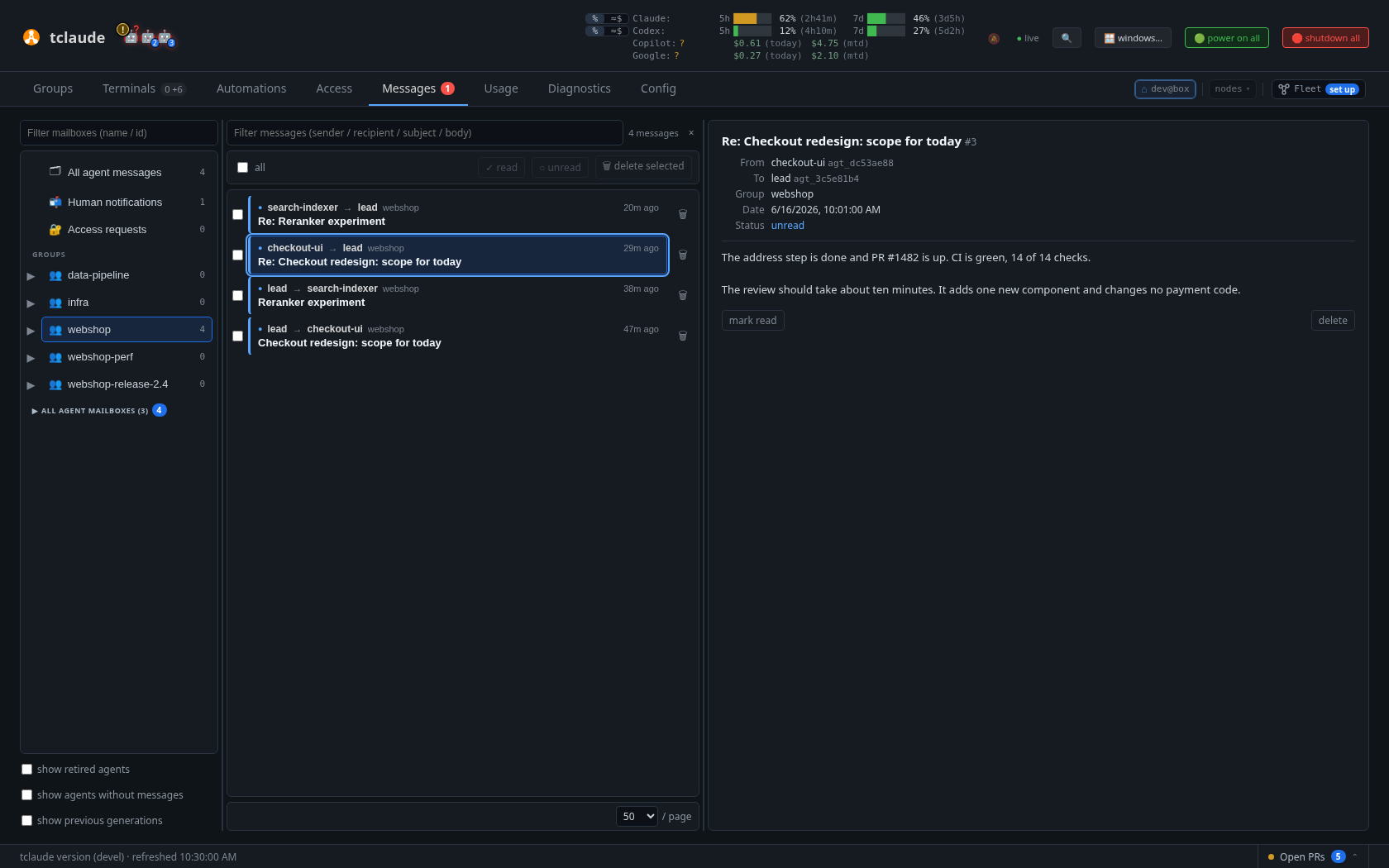
Mailboxes on the left, then the list and the reader
Finding a message
Three panes, which you can resize: folders, list, reader.
| Folder | What's in it |
|---|---|
| 🗂 All agent messages | Everything |
| 📬 Human notifications | What agents sent you with tclaude agent notify-human |
| 🔐 Access requests | Permission requests |
| 👥 Groups | Each group's mail. Expand one to see its members. |
The options under the folders show retired agents, agents without messages, and previous generations. Use ↑, ↓, PageUp and PageDown to move through folders and rows.
Reading and replying
The list is newest first, with direction glyphs, unread and pending markers, and attachment counts. The reader renders Markdown and can reply (in Human notifications), focus the sender's terminal, change read state, or delete. The ⤓ menu downloads the message or does Copy as Markdown. ✓ mark all read and 🗑 delete read clean up Human notifications.
A notification with options shows a button per option and Dismiss, for a decision that no longer matters. A dismissed one says who dismissed it and why.
A notification can also carry one action link: a button that says what it does and, for a terminal, shows the directory.
Writing to agents
- A group:
✉ messagein the group's ⚙ menu, to the whole group or a ticked subset, with role filtering and attachments. - One agent: ✉ Message (Ctrl M) on its pane in Terminals, or ✉ in the companion.
- Everyone live: Announce to all live agents… in the command palette.
Addresses
The open folder and message are in the address: /messages/human,
/messages/group:ops/42, /messages/<conv-id>. Clicking a folder or a
message is a history step, so Back closes the message, then returns to the
previous folder; moving with the arrow keys, or jumping in from another tab,
updates the address in place. The message search, the page and the folder
filter are in the query (/messages/human/42?q=deploy&page=3&box=ops; a
Groups notification link adds from=<agent>): a page step is a history step,
and so is a search or folder-filter edit, recorded once when you start typing
so Back undoes the whole edit. A link opens the folder with that search and
page, and the message if it is still there. The view of several nodes routes
the same way, naming the node that owns an open folder (at=<node>) and the
node chip that narrows the view (scope=<node>); its All folder is the bare
/messages.
Attachments
Attachments have image and video preview. They include a notification's files, files sent with agent mail, and the uploads listed in a startup briefing.
The image and Markdown attachment viewers zoom with the usual inputs: a
trackpad pinch, Ctrl+scroll, or Ctrl/Cmd and + / - / 0 (bare +, -
and 0 work too). Images zoom around the pointer and pan by dragging; the
footer offers Fit and 1:1 (actual pixels), and a double-click toggles between
them. On a touch screen, pinch with two fingers to zoom, drag with one to pan
or scroll, and double-tap an image to toggle between fit and a closer look.
Markdown zoom scales the text and reflows it. Both viewers resize from
their corner grip, maximize to the window (T), and go full screen (button or
F). ← and → step through attachments.
Access requests
The 🔐 Access requests folder is where blocked permission requests (such as
--ask-human) arrive as cards: Approve, Decline, and scoped Always-allow, with a
countdown that declines at zero and a +5m button. A banner and blinking badge show
pending requests from any tab, and their history survives restarts. Review on the banner opens the
approval panel.
Mail between nodes
In Human notifications, ✉ peer writes to a peer's
operator, or to agents on a peer (agent@peer, or group:<group>@peer
optionally by role), with the recent outbox and its delivery state below.
Mail from a peer's operator (it starts with the remote-message banner) gets a reply button. While a peer's operator
is away with you as their cover, the requests they forward arrive here with
Approve once / Deny: one answer for that one request, nothing lasting.
CLI: tclaude federation notify|send|outbox|answer.
A peer operator's request for access to this node (see
Requesting access) lands in the same folder,
naming the peer, the permission, the scope and how long it asked for, plus
its reason. Only you decide these — an away cover never does. A group
permission requested without a group covers every group on this node,
including future ones. Approve can shorten the grant (never lengthen it) or
narrow an any-group request to one group the peer already holds grants in,
and there is no Always-allow for peers. CLI:
tclaude federation access list|approve|deny|extend --id … [--ttl …] [--group-id …].